
Hi,
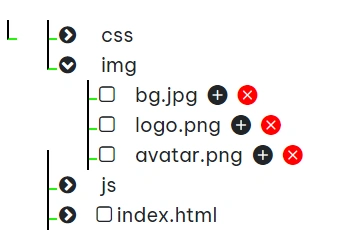
I have created a tree structure in the angular. as per my requirement, need to add two buttons that is ADD and SUB in the node.
EXAMPLE:
> CSS
>Img
>bg.jpg
>logo.png
>avatar.png
>js
>index.html
here, i have 4 nodes, when i clicked the add button against of Img node, the another node should be added in the main tree. that is Img_clone and comes all the files .
like
> CSS
>Img
>bg.jpg
>logo.png
>avatar.png
>js
>index.html
>Img_clone
>bg.jpg
>logo.png
>avatar.png
Rajasekhar YekulaPosted Oct 13, 2023, 9:06 AM
Hi Prasad, Thanks so much.
Prasad RaveendranPosted Oct 2, 2023, 10:26 PM
To achieve this functionality in an Angular application, you can create a tree structure using Angular components and templates, and then add the "ADD" and "SUB" buttons to each node. When the "ADD" button is clicked, you can clone the node and its children and add it to the tree. Here's a high-level outline of how you can implement this:
Create Angular components for the tree structure:
TreeNodeComponent.TreeComponent.Define the data structure for the tree nodes. You can use an array of objects to represent each node and its children. For example:
3. In the
TreeNodeComponenttemplate, display the node name and add "ADD" and "SUB" buttons.4. In the
TreeNodeComponentclass, implement theaddChildandcloneNodemethods:5. In the
TreeComponenttemplate, render the root node of the tree:6. In your Angular application, you can now use the
TreeComponentto display the tree structure. When you click the "ADD" button, a new child node will be added, and when you click the "SUB" button, a clone of the node will be added as a sibling.Remember to import and declare the components in your module files as needed. This is a basic example, and you can customize it further based on your requirements, such as updating the node names or handling more complex tree structures.