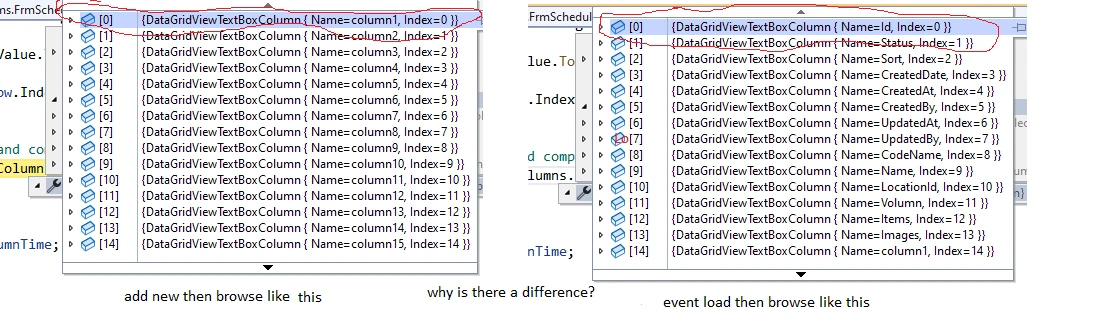
when inserting data is finished into a table A and loop through table A to get the value compared with the data on the datagridview, which is table B. table B only retrieves 1 field of information and adds new as many new columns as you like. why when inserting is done, browse the data in table B in turn are the columns add new and then the remaining fields in table B. but the load event to get the data out again browses the fields in table B then the columns are add new as shown below when I debug 2 cases, add new data and load with the same code
Tuhin PaulPosted Mar 15, 2023, 1:32 AM
Hello honag luc,
Based on the information provided, it seems like the issue you are experiencing is related to the order in which the data is being loaded into the datagridview. When you add new columns to the datagridview, they are added at the end of the datagridview's column collection, and when you load data into the datagridview, it is loaded in the order that the columns appear in the column collection.
To address this issue is to ensure that the order of the columns in the datagridview's column collection is consistent between when you add new columns and when you load data. You can do this by explicitly setting the order of the columns in the column collection using the DisplayIndex property of the DataGridViewColumn object.
For example, you can set the DisplayIndex property of the columns in the datagridview as follows:
This will ensure that the columns are loaded in the same order regardless of whether new columns have been added or not.
You can also try refreshing the datagridview after adding new columns using the Refresh method, like so:
This should cause the datagridview to re-evaluate its column collection and display the columns in the correct order.