Hi Team
I have this issue, each time i am registering the new user, its connection failure to third party. I am using smtp client mail and this domain is gmail. The question why am i getting this often and its not even send a confirming email to the user. It does writes this query to the database colum. What could an issue?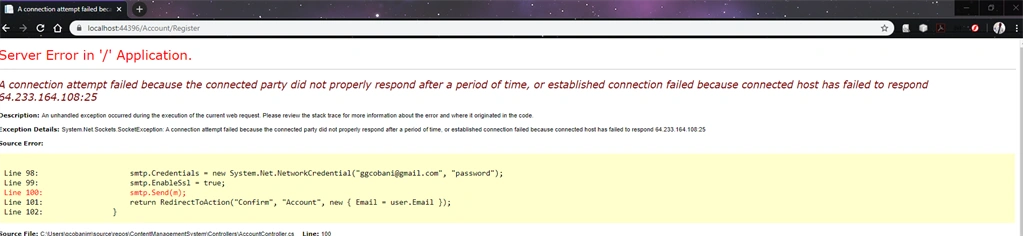

- [HttpPost]
- [AllowAnonymous]
- [ValidateAntiForgeryToken]
- public async Task
Register(RegisterViewModel model) - {
- if (ModelState.IsValid)
- {
- var user = new ApplicationUser() { UserName = model.UserName };
- user.Email = model.Email;
- user.ConfirmedEmail = false;
- var result = await UserManager.CreateAsync(user, model.Password);
- if (result.Succeeded)
- {
- System.Net.Mail.MailMessage m = new System.Net.Mail.MailMessage(
- new System.Net.Mail.MailAddress("[email protected]", "Web Registration"),
- new System.Net.Mail.MailAddress(user.Email));
- m.Subject = "Email confirmation";
- m.Body = string.Format("Dear {0}
Thank you for your registration, please click on the below link to complete your registration: - m.IsBodyHtml = true;
- System.Net.Mail.SmtpClient smtp = new System.Net.Mail.SmtpClient("smtp.gmail.com");
- smtp.Credentials = new System.Net.NetworkCredential("[email protected]", "password");
- smtp.EnableSsl = true;
- smtp.Send(m);
- return RedirectToAction("Confirm", "Account", new { Email = user.Email });
- }
- else
- {
- AddErrors(result);
- }
- }
- // If we got this far, something failed, redisplay form
- return View(model);
- }
Guest UserPosted Feb 6, 2020, 1:42 AM
Amit MohantyPosted Feb 6, 2020, 1:12 AM
solution 1: You need to review the activity. but reviewing the activity will not be helpful due to the latest security standards the link will not be useful. So try the below case.
solution 2: If you have hosted your code somewhere on the production server and if you have access to the production server, then take the remote desktop connection to the production server and try to log in once from the browser of the production server. This will add an exception for login to google and you will be allowed to login from code.
But what if you don't have access to the production server. try the solution 3
solution 3: You have to enable login from other timezone / IP for your google account.
to do this follow the link https://g.co/allowaccess and allow access by clicking the continue button.
Guest UserPosted Feb 6, 2020, 12:25 AM
Amit MohantyPosted Feb 5, 2020, 11:01 PM
Salman BegPosted Feb 5, 2020, 8:51 AM