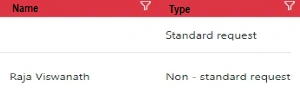
When i filter Name to show the filter error can not read propery "0" of undefined
My Code
--------------------
public TestViewModel
{
public int Id {get; set;}
public string Name {get; set;}
public string Type {get; set;}
}
allowSelection="true" allowSorting="true" allowFiltering="true" allowTextWrap="true"
contextMenuClick="ContextMenuEditClicked" contextMenuItems="contextMenuItems" >
Jayraj ChhayaPosted Nov 29, 2023, 5:48 AM
we need to ensure that the dataSource property is set correctly. Here are the steps to follow:
Make sure that the TestViewModel object is properly populated with data before passing it to the view. You can do this by retrieving the data from a database or any other data source and assigning it to the TestViewModel object.
In the view, make sure that the Model object is properly passed to the view. This can be done by using the appropriate controller action to retrieve the TestViewModel object and pass it to the view.
Update the dataSource property of the grid component to bind it to the TestViewModel object. Assuming that the TestViewModel object is passed to the view as the Model object, the dataSource property should be set as follows: