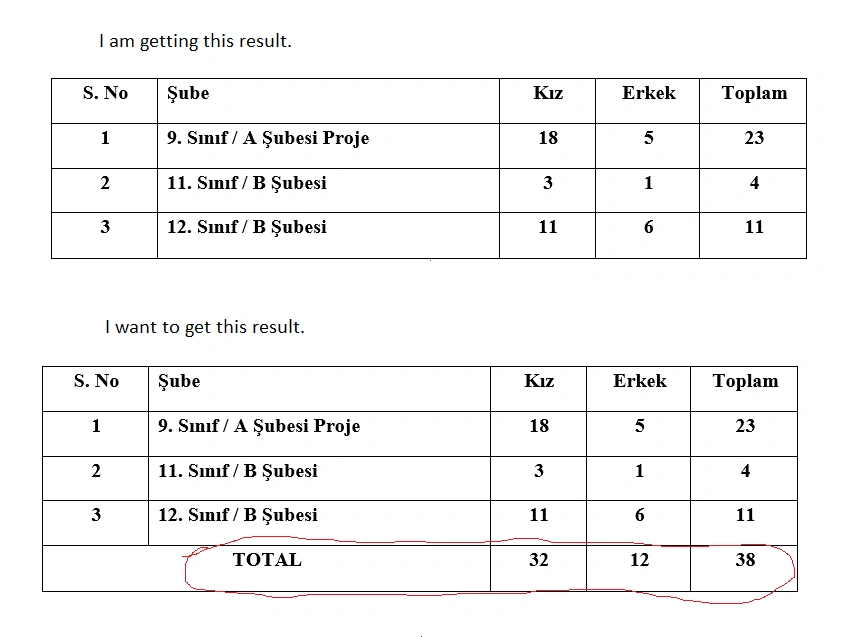
I want to include the grand totals of the data I pulled into the word document. However, I couldn't make it. Is there anyone who can help with this? These are my codes.
using System;
using System.ComponentModel;
using System.Data;
using System.Data.OleDb;
using System.Reflection;
using System.Threading;
using System.Windows.Forms;
using Word = Microsoft.Office.Interop.Word;
private DataTable GetDataSource()
{
    var dt = new DataTable();
    using (var conn = new OleDbConnection("Provider=Microsoft.ACE.OLEDB.12.0;Data Source = gezievrak2541.accdb; Jet OLEDB:Database Password = Fatih2541; Mode = ReadWrite"))
    {
        conn.Open();
        using (var adapter = new OleDbDataAdapter("SELECT COUNT (sinifi) as sno,sinifi, SUM(IIF(cinsiyet = 'Kiz', 1, 0)) as kiz,SUM(IIF(cinsiyet = 'Erkek', 1, 0)) as erkek, COUNT(*) as toplam  FROM gezilistemiz25  where sinifi IS NOT NULL GROUP BY  sinifi order BY Left(sinifi,1) desc,Left(sinifi,13) asc,Left(sinifi,12) asc", conn))
        {
            adapter.Fill(dt);
        }
        conn.Close();
        dt.Dispose();
        return dt;
    }
}
private void Sabitbilgi()
{
    DataTable dt = GetDataSource();
    int iTotalFields = 0;
    object oMissing = Missing.Value;
    Word.Application oWord = new Word.Application();
    oWord.Visible = true;
    object oTemplatePath = Application.StartupPath + "\\GeziPlani.docx";
    Word.Document oWordDoc = oWord.Documents.Add(ref oTemplatePath, ref oMissing, ref oMissing, ref oMissing);
    object Index = "sinifi";
    Word.Table tbl = oWordDoc.Bookmarks.get_Item(ref Index).Range.Tables[1];
    int i = 1; foreach (DataRow r in dt.Rows) r["sno"] = i++; // satir numarasi verir
    foreach (DataRow dr in dt.Rows)
    {
        Word.Row newRow = tbl.Rows.Add(ref oMissing);
        for (int j = 1; j <= dt.Columns.Count; j++)
        {
            newRow.Cells[j].Range.Text = dr[j - 1].ToString();
        }
    }
}
Amit MohantyPosted Jul 3, 2023, 2:14 PM
You can't assign sno value as string value, because its type in integer. Check this:
Mehmet FatihPosted Jul 4, 2023, 11:29 AM
Dear Amit, Thanks for your interest and efforts. It is exactly the thing I want.
Amit MohantyPosted Jul 4, 2023, 10:55 AM
Mehmet FatihPosted Jul 4, 2023, 10:35 AM
It is merging the two cells in the last row, but also is numbering the last row. How can we remove the numbering on the last line?
Amit MohantyPosted Jul 4, 2023, 9:16 AM
check this once
Mehmet FatihPosted Jul 4, 2023, 6:51 AM
It gives thie error for merging. System.Runtime.InteropServices.COMException: 'There is no requested item in the group.'
Amit MohantyPosted Jul 4, 2023, 6:16 AM
Try this for merge first two column of total row:
Mehmet FatihPosted Jul 3, 2023, 2:34 PM
Amit, thanks. The problem has been solved thanks to you. Your are great. Can I make one last request from you? Is there a possibility to remove the numbering in the total row and merge it with the Grand total column as in the image?
Mehmet FatihPosted Jul 3, 2023, 1:41 PM
I have removed the
out int totalRowCount. After removing that line, it gives the error for line int totalRowCount; "CS0168 variable 'totalRowCount' is expressed but never used". When I deactive it, then it gives the following mistake.Amit MohantyPosted Jul 3, 2023, 1:23 PM
Remove the
out int totalRowCountparameater from GetDatasource methodMehmet FatihPosted Jul 3, 2023, 12:27 PM
Amit, I have tried your last code. But I have got this error.
Amit MohantyPosted Jul 3, 2023, 11:46 AM
Try this:
Full code:
Mehmet FatihPosted Jul 2, 2023, 10:09 AM
Thank you Prasad. Your solution is closer to the result. However, it gives this error. "'The specified assignment is not valid.'"
I understood that the problem was in the sql codes, but I could not solve it. It cannot get the grand totals of the numbers of boys and girls.
Mehmet FatihPosted Jul 2, 2023, 9:58 AM
Thanks for your intrest Amit but I have tried your codes and they give this result. It doesn't count the total results.
Mehmet FatihPosted Jul 2, 2023, 9:30 AM
Thanks for your intrest Amit. I have tried your codes but it gives this error. "System.InvalidCastException: 'The specified assignment is not valid.'"
Amit MohantyPosted Jul 2, 2023, 5:48 AM
Prasad RaveendranPosted Jul 2, 2023, 3:30 AM
I understand that you are pulling data from database. I have given you a sample which will provide some insights on how to calculate the column sum and display it as a new row at the bottom.
Please consider this as a sample code, and introduce additional line of code after the line
DataTable dt = GetDataSource();
Prasad RaveendranPosted Jul 1, 2023, 7:01 PM
Please take a look at the below sample code. This will give you some insight on how we can introduce a row which will calculate the total and display at the bottom.
In this example, we create a DataSet and a DataTable to store the dataset. We add rows to the DataTable and calculate the total value of the Price column. Then, we create a new row with the total value and add it to the DataTable. Finally, we print the updated DataSet using the PrintDataSet method.