I work on sql server 2012 i face issue i can't handle invenotry tranfer order from inventory to another
inventory so How to handle that on bussiness
CREATE TABLE [dbo].[ConsumeHeader](
[ID] [int] IDENTITY(1,1) NOT NULL,
[ConsumeNo] [varchar](25) NOT NULL,
[BranchID] [int] NOT NULL,
[ConsumeDate] [datetime] NOT NULL,
[TransactionTypeID] [int] NOT NULL,
[PostingDate] [date] NULL,
[OrderDate] [date] NULL,
[EmployeeID] [int] NOT NULL,
CONSTRAINT [ConsumeNo] PRIMARY KEY CLUSTERED
(
[ID] ASC
)WITH (PAD_INDEX = OFF, STATISTICS_NORECOMPUTE = OFF, IGNORE_DUP_KEY = OFF, ALLOW_ROW_LOCKS = ON, ALLOW_PAGE_LOCKS = ON) ON [PRIMARY]
) ON [PRIMARY]
CREATE TABLE [dbo].[PurchaseHeader](
[ID] [int] IDENTITY(1,1) NOT NULL,
[PurchaseNoText] [varchar](30) NULL,
[BranchID] [int] NOT NULL,
[transactionTypeID] [int] NOT NULL,
[PostingDate] [date] NULL,
[OrderDate] [date] NULL,
[VendorID] [int] NOT NULL,
[Status] [int] NULL,
CONSTRAINT [PurchaseNo] PRIMARY KEY CLUSTERED
(
[ID] ASC
)WITH (PAD_INDEX = OFF, STATISTICS_NORECOMPUTE = OFF, IGNORE_DUP_KEY = OFF, ALLOW_ROW_LOCKS = ON, ALLOW_PAGE_LOCKS = ON) ON [PRIMARY]
) ON [PRIMARY]
CREATE TABLE [dbo].[Invenroty](
[ID] [int] IDENTITY(1,1) NOT NULL,
[TransactionNo] [int] NOT NULL,
[InventoryLocID] [int] NOT NULL,
[TransactionTypeID] [int] NOT NULL,
[InvoiceID] [int] NULL,
[Qty] [decimal](18, 3) NOT NULL,
[UnitPrice] [decimal](18, 3) NULL,
[Total] [decimal](18, 3) NOT NULL,
[ItemID] [int] NOT NULL,
[UnitOfCodeID] [int] NOT NULL,
[PostingDate] [date] NULL,
[ToInventory] [bit] NOT NULL,
CONSTRAINT [InventorySerialID] PRIMARY KEY CLUSTERED
(
[ID] ASC
)WITH (PAD_INDEX = OFF, STATISTICS_NORECOMPUTE = OFF, IGNORE_DUP_KEY = OFF, ALLOW_ROW_LOCKS = ON, ALLOW_PAGE_LOCKS = ON) ON [PRIMARY]
) ON [PRIMARY]
as above when make sales then it store invoice no on inventory as negative
on inventory invoice no
when make purchase then invoice no on inventory will be postive
on inventory and purcehase invoice no will be invoice no on inventory
so How to handle transfer quantity from inventory location to another location
meaning transfer will be minus or postive
are including new table for transfer is nesecary or not
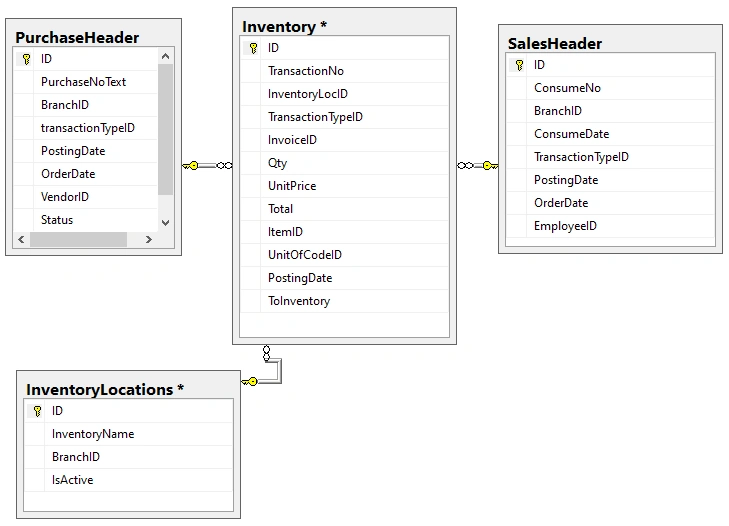
relation below
sales header id - invoice no inventory
purchase header id - invoice no inventory
when transfer quantity from location to another what i add or modify on diagram below
Tuhin PaulPosted Sep 2, 2025, 10:38 AM
Your issue is a very common one in inventory management systems. Based on your schema, the current design handles incoming (Purchase) and outgoing (Consume/Sales) inventory movements, but it doesn't have a clear, distinct process for internal transfers between locations.
The core problem is that a transfer is a unique transaction type that needs to be handled as both a debit and a credit to different locations. Trying to fit it into your existing Purchase or Consume logic will lead to data integrity issues.
The solution is to add a new table to specifically handle transfers.
Proposed Solution
Here is a breakdown of the new table and how it would work within your existing schema.
Add a
TransferHeaderTable: This is the most critical change. A new table is necessary to capture the unique details of a transfer. It should reference both the source and destination locations.Update the
InventoryTable: You need to modify theInventorytable to accommodate this new transaction type. When a transfer occurs, you will create two entries in this table for the same item.Outgoing Entry: A negative
Qtyentry with aTransactionTypeIDfor 'Transfer Out' and a reference to theTransferHeader'sIDin theInvoiceIDcolumn. This decrements the inventory at the source location.Incoming Entry: A positive
Qtyentry with aTransactionTypeIDfor 'Transfer In' and a reference to the sameTransferHeader'sIDin theInvoiceIDcolumn. This increments the inventory at the destination location.Prasad RaveendranPosted Sep 2, 2025, 2:24 AM
Let’s design this properly so your Inventory Transfers work cleanly and don’t break reporting. Right now you already separated PurchaseHeader and ConsumeHeader, so the best design is to treat Transfers as their own transaction type with a header and detail, just like you do for sales and purchases.
Header Table for Transfers
Keeps metadata (who, when, from/to location, status, etc.).
Detail Table for Transfer Items
Keeps line-level details of items being moved.
Inventory Posting (Double-Entry Style)
When transfer is posted, create two records in
Inventory:Outflow from
FromLocationID(-Qty)Inflow into
ToLocationID(+Qty)Why This Is Better
Separation of concerns → Purchases, Sales, Transfers each have their own header/detail.
Auditability → You can see exactly who moved stock, when, and why.
Scalability → You can later add approval workflows, transfer costs, or inter-branch pricing.
Consistency → Reporting is straightforward (same pattern as sales & purchases).
High-Level Flow
Create
TransferHeader+TransferDetail(draft).Approve/post transfer → write two entries into
Inventory.Reports/stock balance query → always sum
Inventory.Qtyper location.Ajay BansodePosted Aug 22, 2025, 11:45 AM
Right now your setup handles Purchases (inflow) and Sales (outflow) correctly by writing entries into
[Inventory]. The problem comes with transfer between locations – because that’s neither purchase nor sale, it’s just movement inside the organization.Let’s break it down.
Current Tables Recap
PurchaseHeader → inflow (positive stock, invoice no stored in
[Inventory])ConsumeHeader (Sales) → outflow (negative stock, invoice no stored in
[Inventory])Inventory → transaction table for all stock movements (positive/negative with location)
So far, good.
What happens in a Transfer?
When you transfer Item X (10 qty) from Location A to Location B:
At Location A → stock should decrease (-10)
At Location B → stock should increase (+10)
This means two entries in
[Inventory]are required.Do you need a new table for transfer?
You have two choices:
Option 1: Use existing
[Inventory]onlyAdd a TransactionTypeID for "Transfer-Out" and "Transfer-In".
Use the same
[Inventory]table to record both sides of transfer.Keep a reference between the two records (so you know which out belongs to which in).
Example: add a column
TransferBatchIDorReferenceIDin[Inventory].Pros:
No new tables, simple design.
Reuses same stock movement logic.
Cons:
Harder to query which transfer is one logical transaction unless you add a reference ID.
Option 2: Create a new TransferHeader + (optional TransferDetail)
When posting a transfer:
Insert into
TransferHeader/Detail.Then create two entries in
[Inventory]:Transfer-Out (negative, FromLocation)
Transfer-In (positive, ToLocation)
Pros:
Business-friendly (audit trail of transfers).
Easier to report "who transferred what where".
Keeps the Inventory table clean (only movements).
Cons:
Slightly more tables & joins.
Suggested Diagram Update
Keep
PurchaseHeader↔Inventory(positive).Keep
ConsumeHeader↔Inventory(negative).Add
TransferHeader↔Inventory(both negative & positive).So
[Inventory]remains the universal transaction ledger, and Headers (Purchase/Sales/Transfer) are just sources.