
Dear Code Masters,
Good day to you all, I have a web page that have a textbox and a button for searching student record.
if the student id is entered in the textbox and the button is clicked the c# code behind search and displayed the record if found. The database structure is shown below :
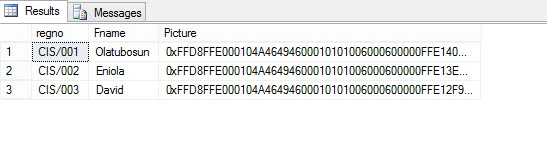
once we search the record "cis/001" i expect the name, RegNo and the image to displayed on my development machine it worked fine, but after deploying both the database and the files to the cloud it is not working.
i have tried using this code:
- Image1.ImageUrl = "ImageHandler.ashx?id=" + "CIS/001";
- DT = ConnectAll.GetTableID(id);
- foreach (DataRow r in DT.Rows)
- {
- Byte[] bytes = (Byte[])r["picture"];
- string Base64String = Convert.ToBase64String(bytes, 0, bytes.Length);
- Image1.ImageUrl = "data:image/png;base64," + Base64String;
- }
- public void ProcessRequest (HttpContext context) {
- //context.Response.ContentType = "text/plain";
- //context.Response.Write("Hello World");
- try
- {
- string id = context.Request.QueryString["id"].ToString();
- using (SqlConnection cn = new SqlConnection(ConnectAll.ConnectMe()))
- {
- cn.Open();
- string SQL = "Select * from tbl_studReg where id ="+id;
- SqlCommand cmd = new SqlCommand(SQL, cn);
- //cmd.CommandType = CommandType.Text;
- //cmd.Parameters.AddWithValue("@id", id.ToString());
- SqlDataReader r = cmd.ExecuteReader();
- while (r.Read())
- {
- context.Response.BinaryWrite((byte[])r["picture"]);
- }
- }
- }
- catch (Exception ex)
- {
- }
- }
- DT = ConnectAll.GetTableID(id);
- foreach (DataRow r in DT.Rows)
- {
- Byte[] bytes = (Byte[])r["picture"];
- string Base64String = Convert.ToBase64String(bytes, 0, bytes.Length);
- Image1.ImageUrl = "data:image/png;base64," + Base64String;
- }
all these did wor either but on my machine both method work fine displaying the image and the other records. Please can anyone help me?
thank you all
Karthik ElumalaiPosted May 10, 2017, 9:52 PM
Sameer ShaikPosted May 10, 2017, 8:55 AM
Abraham OlatubosunPosted May 10, 2017, 8:22 AM
Sameer ShaikPosted May 10, 2017, 2:49 AM