I'm building a program that converts a .xlsx-file to a fixed width file.
I'm very new at this so it goes very slow.
I want to take the data from a DataTable and then create a fixed width file.
I was able to get the first part to work, getting the data to datatable, but i am stuck with creating the file.
The table looks like this:
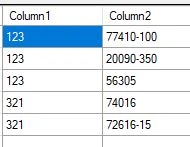
I want the file to look like this:
KOH A 123 B
KOL
KOHF
KOR 77410-100
KOR 20090-350
KOR 56305
KOH A 321 B
KOL
KOHF
KOR 74016
KOR 72616-15
But with the code i've done so far the file looks like this (And repeats):
KOH A 123 B
KOL
KOHF
KOR 77410-100
KOR 20090-350
KOR 56305
KOR 74016
KOR 72616-15
KOR
KOR
KOR
KOR
KOR
KOH A 123 B
KOL
KOHF
KOR 77410-100
KOR 20090-350
KOR 56305
KOR 74016
KOR 72616-15
This is the code:
            for (int i = 0; i < dt.Rows.Count; i++)
            {
                DataRow dr = dt.Rows[i];

                sfw.WriteLine("KOH" + "A".PadLeft(3).PadRight(8) + dr["Column1"].ToString().PadRight(6) + "B".PadLeft(15));

                sfw.WriteLine("KOL");
                sfw.WriteLine("KOHF");

                for (int r = 0; r < dt.Rows.Count; r++)
                {
                    DataRow drow = dt.Rows[r];
                    sfw.WriteLine("KOR" + drow["Column2"].ToString().PadLeft(11));
                }
            }

            sfw.Close();
Can anyone help me with this?
Tuhin PaulPosted May 15, 2023, 10:02 AM
This code works by first writing the first row of the second loop. It then increments the loop counter and checks the next row. If the next row has the same value in the Column1 column, then the code writes the row to the output stream. This process continues until the loop counter reaches the end of the DataReader.
Tomas SundbergPosted May 15, 2023, 5:19 AM
I tried what Rajkiran Swain was suggesting, and that was almost perfect. The only problem is that the first row in the second loop are skipped. How can i get the same functionality but with no rows skipped?
Tuhin PaulPosted May 13, 2023, 2:17 AM
First, you need to change the way you are iterating through the rows of the DataTable. You are currently iterating through the rows twice, which is why the file is repeating. You should only need to iterate through the rows once.
Second, you need to change the way you are formatting the data. You are currently formatting the data as a string, but you need to format it as a fixed-width file.
This code will iterate through the rows of the DataTable once and format the data as a fixed-width file. When you run this code, the output file will look like this:
Rajkiran SwainPosted May 12, 2023, 2:15 PM