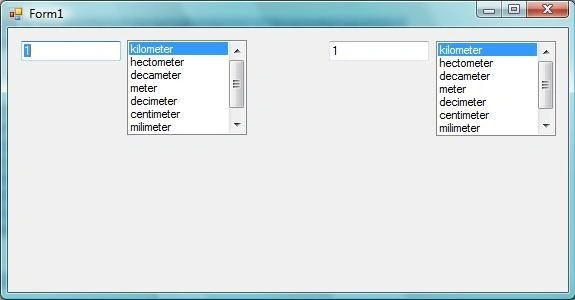
I don't want any submit button. When I entering first textbox, the second textbox must show result on every changing in first textbox. OR listbox changings must change the result in the textbox2.
My very primitive codes are here. What are my mistakes?
CODE:
using System;
using System.Collections.Generic;
using System.ComponentModel;
using System.Data;
using System.Drawing;
using System.Linq;
using System.Text;
using System.Windows.Forms;
namespace Conversion
{
public partial class Form1 : Form
{
public Form1()
{
InitializeComponent();
{
listBox1.SelectionMode = SelectionMode.One;
listBox1.SetSelected(0, true);
listBox2.SelectionMode = SelectionMode.One;
listBox2.SetSelected(0, true);
Double DoubleSayi = Double.Parse(textBox1.Text);
Double DoubleKatsayi1 = 1;
Double DoubleKatsayi2 = 1;
Double DoubleSonuc = DoubleSayi*(DoubleKatsayi1 / DoubleKatsayi2);
textBox2.Text = DoubleSonuc.ToString();
switch (listBox1.SelectedItem.ToString())
{
case "kilometer": DoubleKatsayi1 = 1000; break;
case "hectometer": DoubleKatsayi1 = 100; break;
case "decameter": DoubleKatsayi1 = 10; break;
case "meter": DoubleKatsayi1 = 1; break;
case "decimeter": DoubleKatsayi1 = 0.1; break;
case "centimeter": DoubleKatsayi1 = 0.01; break;
case "milimeter": DoubleKatsayi1 = 0.001; break;
case "micrometer": DoubleKatsayi1 = 0.000001; break;
}
switch (listBox2.SelectedItem.ToString())
{
case "kilometer": DoubleKatsayi2 = 1000; break;
case "hectometer": DoubleKatsayi2 = 100; break;
case "decameter": DoubleKatsayi2 = 10; break;
case "meter": DoubleKatsayi2 = 1; break;
case "decimeter": DoubleKatsayi2 = 0.1; break;
case "centimeter": DoubleKatsayi2 = 0.01; break;
case "milimeter": DoubleKatsayi2 = 0.001; break;
case "micrometer": DoubleKatsayi2 = 0.000001; break;
}
}
}
private void Form1_Load(object sender, EventArgs e)
{
}
}
}
END OF CODE
Amit ChoudharyPosted Dec 26, 2012, 4:59 AM
There's an event OnKeyUp for textBoxes you can write an eventHandler for it and put this code there. Then you're at right place to startwith.
If you don't know how to create handler here's a quick tip:
Select the desired textBox -> press F4 (for properties window) -> select the events option in the header of window. Now double click on your desired event. It'll generate an empty body handler method for you. Just place your code there and see if its working.