
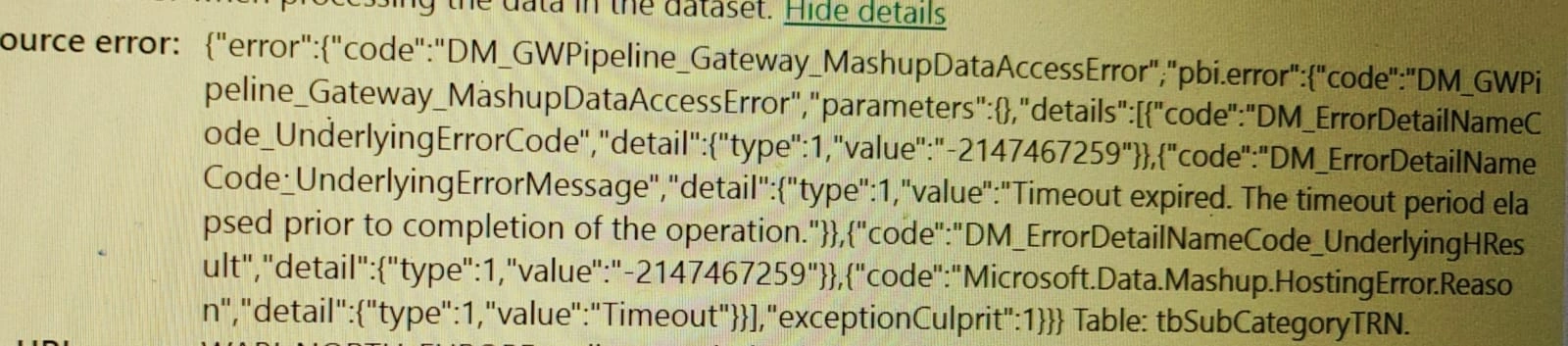
I make some schedule timings for data refresh in powerBI Service. Sometime the schedule refresh was failed sometimes takes a long time and sometimes it tales less than 15 min to refresh. What is the region behind it, is it continues or make any actions to avoid that issues. Makes me understandable if any one knows on this.
Anandu G NathPosted Feb 6, 2024, 6:49 AM
ASP.Net Hub,ASP.Net Hub,ASP.Net Hub
Asp.NetHub,#Asp.NetHub,Asp.NetHub,Asp.NetHub,Asp.NetHub,Asp.NetHub,Asp.NetHub
How to Create simple Login Form in C# winforms?
How to Create modular Login Form in c# WindowsForms?
https://youtube.com/@asp.netsimpletutorial3964?si=1SdUvvq2SuNiLVzA
Mohammad HussainPosted Feb 6, 2024, 6:49 AM
Hi Chinna,
Please check this,
I think it will help you to understand the PBI refresh process and also it will help you to fix the issue.
Jayraj ChhayaPosted Feb 5, 2024, 12:26 PM
One possible reason for failed refreshes could be connectivity issues between Power BI Service and your data source. Ensure that the data source is accessible and that the credentials used for the refresh are valid. Additionally, check if there are any network or firewall restrictions that might be blocking the refresh process.
Another factor that can affect the refresh time is the size and complexity of your dataset. Larger datasets or those with complex transformations and calculations may take longer to refresh. Consider optimizing your data model and queries to improve refresh performance.
It's also worth noting that the performance of the underlying data source can impact the refresh time. If the data source is slow or experiencing high loads, it can cause delays in the refresh process. Monitor the performance of your data source and consider optimizing it if necessary.
To avoid these issues, you can take several actions. First, ensure that your data source is properly configured and optimized for performance. Test the refresh process with a smaller dataset to identify any potential issues. Additionally, schedule the refresh during off-peak hours to minimize the impact on system resources.
Regularly monitoring the refresh process and reviewing the refresh history in Power BI Service can help you identify any recurring issues and take appropriate actions to resolve them.