

This article explains the following topics:
- How to create a WCF service
- How to consume the WCF service in your ASP.Net application
- How to bind a GridView using the WCF service
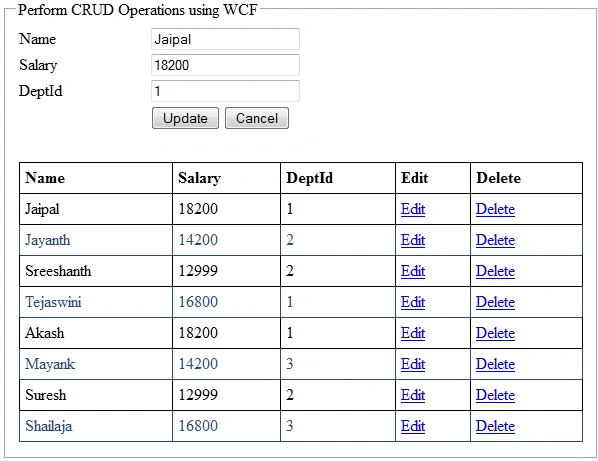
- How to do insert, edit, update and delete operations on the GridView using the WCF service
The Database
Set up your database depending on the requirements. In the following WCF CRUD example I use the following tables and Stored Procedures.
Mas_Employee table
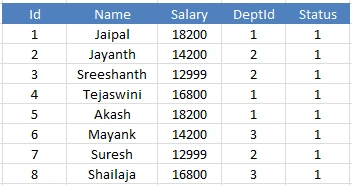
Figure 1: Mas_Employee table
Mas_Department table
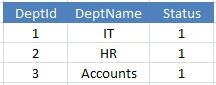
Figure 2: Mas_Department table
To get the emplyees by am optional parameter:
- Create Procedure Get_AllEmployees
- @Id int = null
- AS
- Begin
- Select E.Id, E.Name, E.Salary,E.DeptID,D.DeptName
- From Mas_Employee E
- Join Mas_Department D
- On E.DeptId = D.DeptId
- where D.Status = 1
- And Id = Isnull(@Id, Id)
- End
To Insert emplyee details into the Mas_Employee table:
- Create Procedure USP_Emp_Insert
- @Name varchar(50),
- @Salary int,
- @DeptId int
- AS
- Begin
- Insert into Mas_Employee
- (Name,Salary,DeptId) Values
- (@Name,@Salary,@DeptId)
- End
To update the emplyee details in the Mas_Employee table:
- Create Procedure USP_Emp_Update
- @Id int,
- @Name varchar(50),
- @Salary int,
- @DeptId int
- AS
- Begin
- update Mas_Employee Set
- Name=@Name,
- Salary=@Salary,
- DeptId=@DeptId
- where Id=@Id
- End
To delete emplyee details in the Mas_Employee table:
- Create Procedure USP_Emp_Delete
- @Id int
- AS
- Begin
- Delete From Mas_Employee
- where Id=@Id
- End
WCF Service and Application
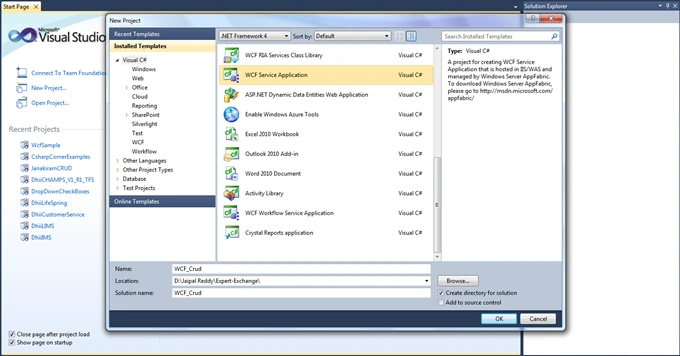
Open Visual Studio then go to "File" -> "New" -> "Project..." then select WCF Service Application and provide it the name " WCF_Crud" as shown in the following image.
Two files, IService1.cs and Service1.svc, will be added under the project in the Solution Explorer as shown in the following image.

Figure 4: Solution Explorer
In the web.config.
Here you have seen some predefined code that is automatically generated when the WCF Service Application is created.
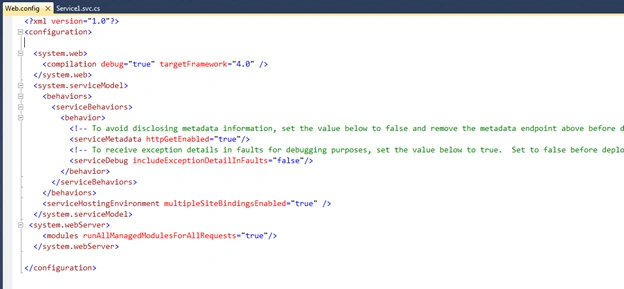
Figure 5: Web Config
Next make a ConnectionString in the Wb.Config as in the following:
- <connectionStrings>
- <add name="conStr" connectionString="Password=1234; User ID=sa; Database=DB_WCF; Data Source=." providerName="System.Data.SqlClient"/>
- </connectionStrings>
Next open the Iservices1.cs file and remove all the default code and declare the Service Contracts, Operation Contracts and Data Contracts.
Add the following namespace first:
- using System.Data;
- namespace WCF_Crud
- {
- [ServiceContract]
- public interface IService1
- {
- [OperationContract]
- string InsertEmpDetails(EmpDetails eDatils);
- [OperationContract]
- DataSet GetEmpDetails(EmpDetails eDatils);
- [OperationContract]
- DataSet FetchUpdatedRecords(EmpDetails eDatils);
- [OperationContract]
- string UpdateEmpDetails(EmpDetails eDatils);
- [OperationContract]
- bool DeleteEmpDetails(EmpDetails eDatils);
- }
- // Use a data contract as illustrated in the sample below to add composite types to service operations.
- [DataContract]
- public class EmpDetails
- {
- int ? eId;
- string eName = string.Empty;
- string eSalary = string.Empty;
- string eDeptId = string.Empty;
- string eDeptName = string.Empty;
- [DataMember]
- public int ? Id
- {
- get {
- return eId;
- }
- set {
- eId = value;
- }
- }
- [DataMember]
- public string Name
- {
- get {
- return eName;
- }
- set {
- eName = value;
- }
- }
- [DataMember]
- public string Salary
- {
- get {
- return eSalary;
- }
- set {
- eSalary = value;
- }
- }
- [DataMember]
- public string DeptId
- {
- get {
- return eDeptId;
- }
- set {
- eDeptId = value;
- }
- }
- [DataMember]
- public string DeptName
- {
- get {
- return eDeptName;
- }
- set {
- eDeptName = value;
- }
- }
- }
- }
And next open the Service.svc.cs file and remove the default code and define the methods declared in the IService1.cs above.
Add the following namespaces:
- using System.Data;
- using System.Data.SqlClient;
- using System.Configuration;
- namespace WCF_Crud
- {
- // NOTE: You can use the "Rename" command on the "Refactor" menu to change the class name "Service1" in code, svc and config file together.
- public class Service1: IService1
- {
- SqlConnection con = new SqlConnection(ConfigurationManager.ConnectionStrings["ConStr"].ConnectionString);
- public string InsertEmpDetails(EmpDetails eDetails)
- {
- string Status;
- SqlCommand cmd = new SqlCommand("USP_Emp_Insert", con);
- cmd.CommandType = CommandType.StoredProcedure;
- cmd.Parameters.AddWithValue("@Name", eDetails.Name);
- cmd.Parameters.AddWithValue("@Salary", eDetails.Salary);
- cmd.Parameters.AddWithValue("@DeptId", eDetails.DeptId);
- if (con.State == ConnectionState.Closed)
- {
- con.Open();
- }
- int result = cmd.ExecuteNonQuery();
- if (result == 1)
- {
- Status = eDetails.Name + " " + eDetails.Salary + " registered successfully";
- }
- else
- {
- Status = eDetails.Name + " " + eDetails.Salary + " could not be registered";
- }
- con.Close();
- return Status;
- }
- public DataSet GetEmpDetails(EmpDetails eDetails)
- {
- SqlCommand cmd = new SqlCommand("Get_AllEmployees", con);
- cmd.CommandType = CommandType.StoredProcedure;
- cmd.Parameters.AddWithValue("@Id", eDetails.Id);
- if (con.State == ConnectionState.Closed)
- {
- con.Open();
- }
- SqlDataAdapter da = new SqlDataAdapter(cmd);
- DataSet ds = new DataSet();
- da.Fill(ds);
- cmd.ExecuteNonQuery();
- con.Close();
- return ds;
- }
- public DataSet FetchUpdatedRecords(EmpDetails eDetails)
- {
- SqlCommand cmd = new SqlCommand("Get_AllEmployees", con);
- cmd.CommandType = CommandType.StoredProcedure;
- cmd.Parameters.AddWithValue("@Id", eDetails.Id);
- if (con.State == ConnectionState.Closed)
- {
- con.Open();
- }
- SqlDataAdapter da = new SqlDataAdapter(cmd);
- DataSet ds = new DataSet();
- da.Fill(ds);
- cmd.ExecuteNonQuery();
- con.Close();
- return ds;
- }
- public string UpdateEmpDetails(EmpDetails eDetails)
- {
- string Status;
- SqlCommand cmd = new SqlCommand("USP_Emp_Update", con);
- cmd.CommandType = CommandType.StoredProcedure;
- cmd.Parameters.AddWithValue("@Id", eDetails.Id);
- cmd.Parameters.AddWithValue("@Name", eDetails.Name);
- cmd.Parameters.AddWithValue("@Salary", eDetails.Salary);
- cmd.Parameters.AddWithValue("@DeptId", eDetails.DeptId);
- if (con.State == ConnectionState.Closed)
- {
- con.Open();
- }
- int result = cmd.ExecuteNonQuery();
- if (result == 1)
- {
- Status = "Record updated successfully";
- }
- else
- {
- Status = "Record could not be updated";
- }
- con.Close();
- return Status;
- }
- public bool DeleteEmpDetails(EmpDetails eDetails)
- {
- SqlCommand cmd = new SqlCommand("USP_Emp_Delete", con);
- cmd.CommandType = CommandType.StoredProcedure;
- cmd.Parameters.AddWithValue("@Id", eDetails.Id);
- if (con.State == ConnectionState.Closed)
- {
- con.Open();
- }
- cmd.ExecuteNonQuery();
- con.Close();
- return true;
- }
- }
- }
Go to the Solutions Explorer then right-click on Service1.svc then click on "View in Browser" as shown in the following diagram.
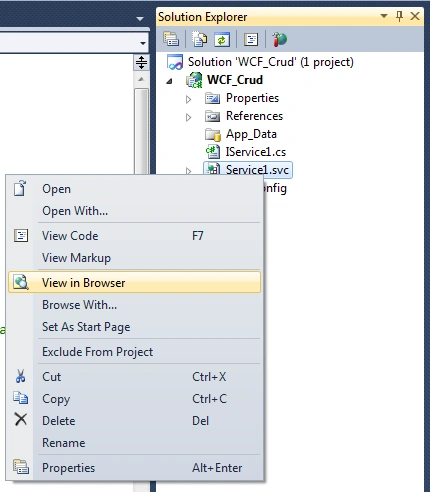
Figure 6: View in Browser
It will appear as shown in the following image:
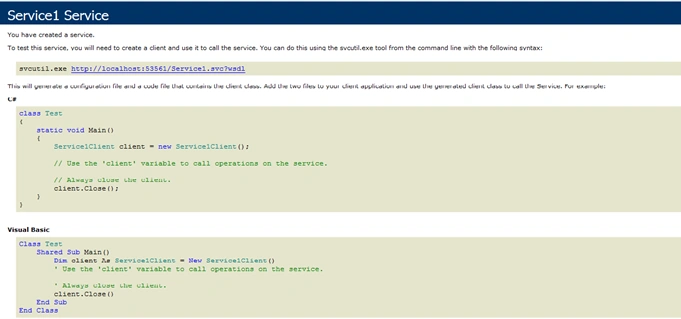
Figure 7: Service1
Copy the URL. Keep it in a Notepad instance. Why? Because it will be used later when consuming this WCF service in your application. You have now created your WCF service successfully. And the next thing is to to call/consume this service in your ASP.Net application.
Create your ASP.Net application and consume the preceding new WCF service
Open Visual Studio then go to "File" -> "New" -> "Project..." then select Web -> ASP.Net Empty Web Application and name it "ConsumeWcfCrud" as shown in the following image:
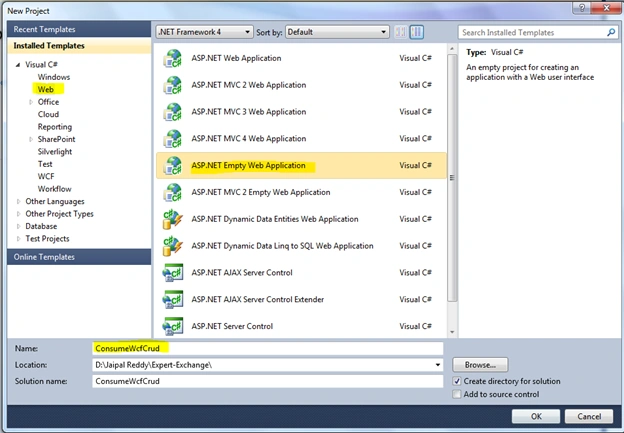
Figure 8: ASP.NET Empty Application
Next add a webfrom to your project and name it Samle.aspx.
To consume/call the WCF service and its methods we need to add the service reference. For that go to Solution Explorer then right-click on the project then select add Service Reference as shown in the following image.
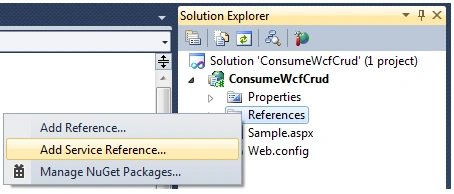
Figure 9: Add Service Reference
A new window will appear as shown in the following image:
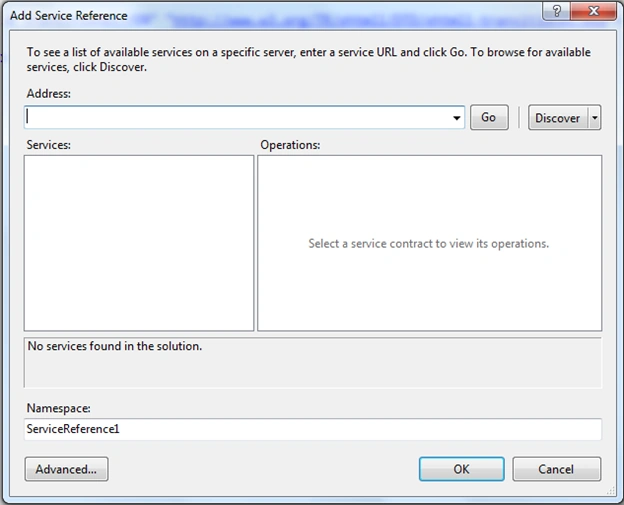
Figure 10: Add Address
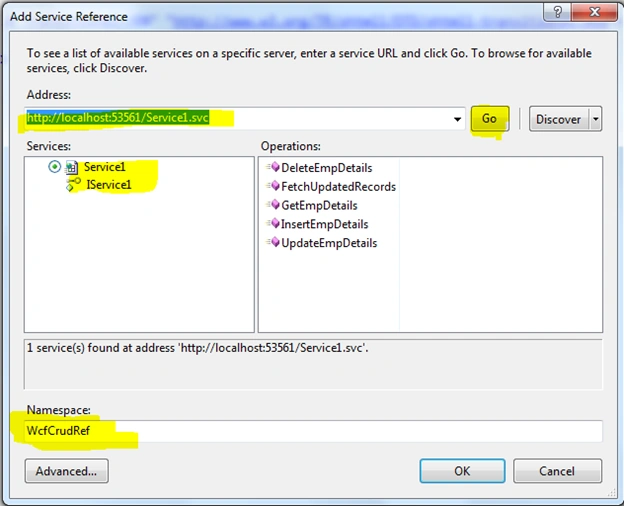
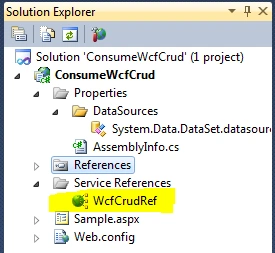
Paste the copied Service URL, http://localhost:53561/Service1.svc, as shown in the following image. Next click on the GO Button. Expand the Services and click on Iservice1. It will list all the functions/methods created in Services. Change the namespace ServiceReference1 to WcfCrudRef or you can use your own namespace and then click on the OK button.
Manoj KumarPosted Apr 4, 2022, 6:02 AM
What is the use of status in table
Sergey ErmilovPosted Nov 13, 2020, 2:37 PM
Why are FetchUpdatedRecords(EmpDetails eDetails) and DataSet GetEmpDetails(EmpDetails eDatils) absolutely identical except for the name?
Ramendra kumar vermaPosted Jan 18, 2018, 5:27 AM
It should be consume web service by jquery method
Satyaprakash SamantarayPosted May 29, 2017, 5:41 AM
Can u share these table script?........................
Kumar VaddadiPosted Dec 28, 2016, 2:33 AM
And attaching this BindingConfiguration to endpoint
Kumar VaddadiPosted Dec 28, 2016, 2:33 AM
<readerQuotas maxDepth="2147483647" maxStringContentLength="2147483647" maxArrayLength="2147483647" maxBytesPerRead="2147483647" maxNameTableCharCount="2147483647" />
Kumar VaddadiPosted Dec 28, 2016, 2:33 AM
1. Even though I am supplying maxArrayLength in readerQuotas
Kumar VaddadiPosted Dec 28, 2016, 2:33 AM
The InnerException message was 'There was an errordeserializing the object of type SelDataSerConsoleApplication1.ServiceReference1 .EventDefinition[]. The maximum array length quota (1) or the maximum items in o bject graph quota has been exceeded while reading XML data. These quotas may be increased by changing the MaxArrayLength property on XmlDictionaryReaderQuotas o r the MaxItemsInObjectGraph setting. Line 1, position 2720969.'
Kumar VaddadiPosted Dec 28, 2016, 2:32 AM
I am unable to do this using Windows Forms ..Wcf Test Client, withdataGridView control, I am getting error:
Jaipal ReddyPosted Mar 19, 2016, 1:06 AM
Thank you Sonu Chaudhary.
Sonu ChaudharyPosted Mar 18, 2016, 3:16 PM
thanks
Jaipal ReddyPosted Aug 25, 2015, 10:54 PM
Yes Bryant Stewart, we can consume wcf service in win forms too.
Bryant StewartPosted Aug 25, 2015, 11:24 AM
CAN I USE WINDOWS USING WCF crud FORM?
Jaipal ReddyPosted Jun 26, 2015, 4:47 AM
Thank you Rasmiranjan sahoo
Rasmiranjan sahooPosted Jun 26, 2015, 2:59 AM
Nice article for beginners
Jaipal ReddyPosted Jun 25, 2015, 6:02 AM
Thank you indika bileeta
indika bileetaPosted Jun 25, 2015, 5:59 AM
Nice article relay appreciate your effort.
Rahul Kumar SaxenaPosted Jun 25, 2015, 4:06 AM
Good show
Debasis SahaPosted Jun 25, 2015, 12:41 AM
Nice one
Gopi ChandPosted Jun 24, 2015, 11:30 PM
Nice one jaipal
Santhakumar MunuswamyPosted Jun 24, 2015, 11:28 PM
Thanks for good work. keep it up
Afzaal Ahmad ZeeshanPosted Jun 24, 2015, 8:51 PM
Good article, but, just asking... You should consider using ASP.NET MVC, that is the next big thing. To use Web Forms you would have to stick to .NET instead of ASP.NET. There is a "huge" difference. :)
sreenivasa kPosted Jun 24, 2015, 5:44 PM
very nice explanation. Please share if you have the complete code snippet