


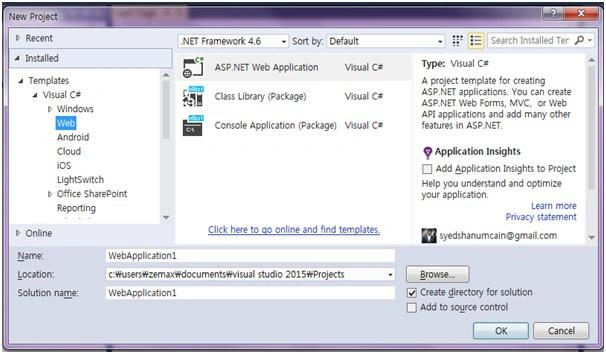
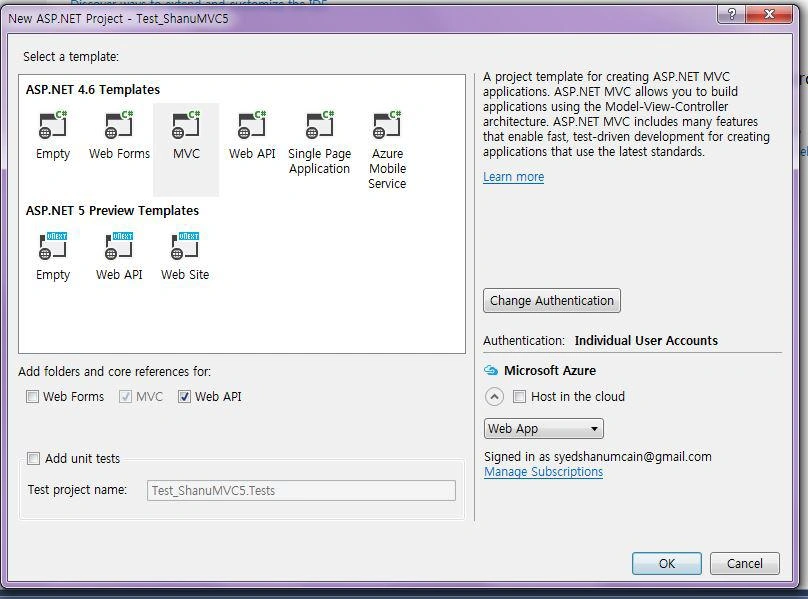
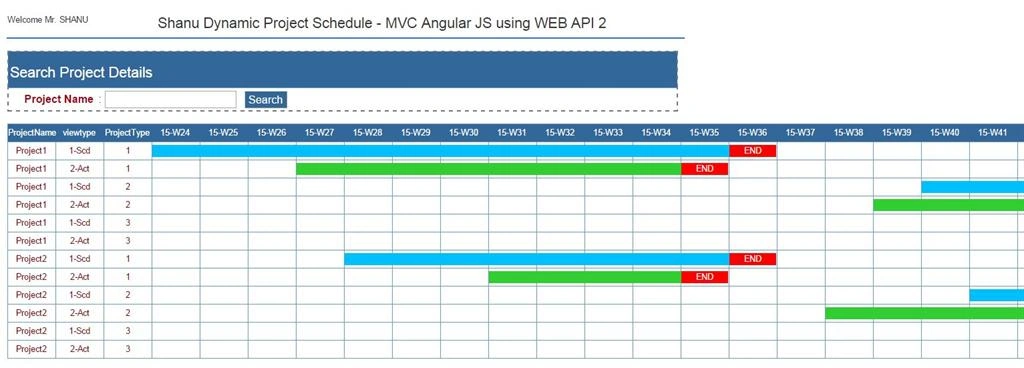
In this article we can see how to create a simple Dynamic Project Scheduling from a database using a Stored Procedure with Pivot result. Display the result to MVC view using AngularJS and Web API 2 without using Entity Framework.
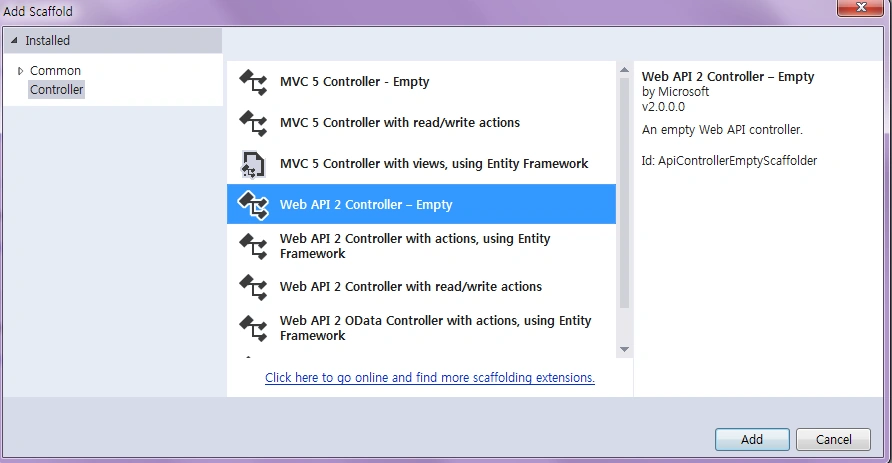
In this example I didn't use Entity Framework. The reason for not using EF is for EF we need to get the result of the select with fixed columns (the columns need to be defined) for example from our Stored Procedure we usually do a select result like “select column1,column2,column3 from table”. But for our example I have used the pivot result and the columns will be displayed dynamically depending on the date range and I am using the “exec sp_executesql @SQLquery;” in my SP to execute the dynamic query I. Insted of using the Entity Framework in my Web API I will be connecting to the database directly and execute the SP to return the result. From my AngularJS Controller I will call the Web API method to return the result.
Project Scheduling
Project Scheduling is a very important part in project planning. The project might be any type, for example software project development planning, production planning and so on. For a realistic example let's consider a car seat manufacturing company. Every week they will produce, for example, 100 sets of seats for a model of car. In the factory everything will go as planned, for example from this week beginning Monday to this week ending Friday a total of 100 seats need to be manufactured and delivered to the customer. Here we can see this is the plan since we need to produce 100 seats and deliver them to the customer. But for some reason the production could only make 90 sets of seats or production has made 100 set of seats in time. To track the production plan with the actual plan we use the Production Schedule Chart. The production plan will have both a start and end date, when the production must be started and when the production needs to be finished. The actual date is the real production start and the end date. The actual start and end dates will be set after the production is completed. If the actual date is the same or below the production end date then it's clear that the production is on time and it can be delivered to the customer. If the actual end date is past the production plan date then the production line must be closely watched and again the next time the same delay should be avoided.
In the project there might be 2 dates available, one is the scheduled start and end dates (this is the initial planned date or the target date for our project) and another one is the actual start and end date (this is when the project is actually started and completed). For all the projects we need to compare both the scheduled and actual dates, if there are greater differences in both of the dates then we need to check whether the project is completed within the scheduled time or if there was a delay in project development.
Previous articles related to Angular JS,MVC and WEB API:
- Create Database and Table
We will create a SCHED_Master table under the Database 'projectDB'. The following is the script to create a database, table and sample insert query. Run this script in your SQL Server. I have used SQL Server 2012.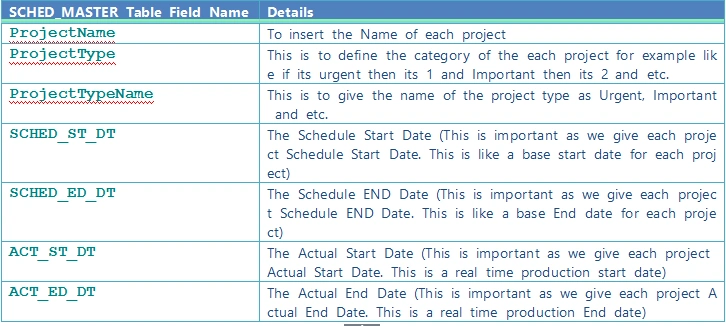
- --Script to create DB,Table and sample Insert data
- USE MASTER
- GO
- -- 1) Check for the Database Exists .If the database is exist then drop and create new DB
- IF EXISTS (SELECT [name] FROM sys.databases WHERE [name] = 'projectDB' )
- DROP DATABASE projectDB
- GO
- CREATE DATABASE projectDB
- GO
- USE projectDB
- GO
- CREATE TABLE [dbo].[SCHED_Master](
- [ID] [int] NOT NULL,
- [ProjectName] [varchar](100) NULL,
- [ProjectType] int NULL,
- [ProjectTypeName] [varchar](100) NULL,
- [SCHED_ST_DT] [datetime] NULL,
- [SCHED_ED_DT] [datetime] NULL,
- [ACT_ST_DT] [datetime] NULL,
- [ACT_ED_DT] [datetime] NULL,
- [status] int null
- PRIMARY KEY CLUSTERED
- (
- [ID] ASC
- )WITH (PAD_INDEX = OFF, STATISTICS_NORECOMPUTE = OFF, IGNORE_DUP_KEY = OFF, ALLOW_ROW_LOCKS = ON, ALLOW_PAGE_LOCKS = ON) ON [PRIMARY]
- ) ON [PRIMARY]
- -- Insert Query
- INSERT INTO [dbo].SCHED_Master
- ([ID],[ProjectName],[ProjectType],[ProjectTypeName],[SCHED_ST_DT],[SCHED_ED_DT],[ACT_ST_DT],[ACT_ED_DT],[status])
- VALUES
- (1001,'Project1',1,'Urgent','2015-06-01 00:00:00.000','2015-09-02 00:00:00.000'
- ,'2015-06-22 00:00:00.000','2015-08-26 00:00:00.000',1)
- INSERT INTO [dbo].SCHED_Master
- ([ID],[ProjectName],[ProjectType],[ProjectTypeName],[SCHED_ST_DT],[SCHED_ED_DT],[ACT_ST_DT],[ACT_ED_DT],[status])
- VALUES
- (1002,'Project1',2,'Important','2015-09-22 00:00:00.000','2015-12-22 00:00:00.000'
- ,'2015-09-19 00:00:00.000','2015-12-29 00:00:00.000',1)
- INSERT INTO [dbo].SCHED_Master
- ([ID],[ProjectName],[ProjectType],[ProjectTypeName],[SCHED_ST_DT],[SCHED_ED_DT],[ACT_ST_DT],[ACT_ED_DT],[status])
- VALUES
- (1003,'Project1',3,'Normal','2016-01-01 00:00:00.000','2016-03-24 00:00:00.000'
- ,'2016-01-01 00:00:00.000','2016-03-14 00:00:00.000',1)
- INSERT INTO [dbo].SCHED_Master
- ([ID],[ProjectName],[ProjectType],[ProjectTypeName],[SCHED_ST_DT],[SCHED_ED_DT],[ACT_ST_DT],[ACT_ED_DT],[status])
- VALUES
- (1004,'Project2',1,'Urgent','2015-07-01 00:00:00.000','2015-09-02 00:00:00.000'
- ,'2015-07-22 00:00:00.000','2015-08-26 00:00:00.000',1)
- INSERT INTO [dbo].SCHED_Master
- ([ID],[ProjectName],[ProjectType],[ProjectTypeName],[SCHED_ST_DT],[SCHED_ED_DT],[ACT_ST_DT],[ACT_ED_DT],[status])
- VALUES
- (1005,'Project2',2,'Important','2015-09-29 00:00:00.000','2015-12-22 00:00:00.000'
- ,'2015-09-08 00:00:00.000','2015-12-14 00:00:00.000',1)
- INSERT INTO [dbo].SCHED_Master
- ([ID],[ProjectName],[ProjectType],[ProjectTypeName],[SCHED_ST_DT],[SCHED_ED_DT],[ACT_ST_DT],[ACT_ED_DT],[status])
- VALUES
- (1006,'Project2',3,'Normal','2016-01-01 00:00:00.000','2016-03-04 00:00:00.000'
- ,'2016-01-01 00:00:00.000','2016-02-24 00:00:00.000',1)
- -- Select Query
- select ID,ProjectName,ProjectType,ProjectTypeName,SCHED_ST_DT,SCHED_ED_DT,ACT_ST_DT,ACT_ED_DT,status from SCHED_Master
Insert Query
- INSERT INTO[dbo].SCHED_Master([ID], [ProjectName], [ProjectType], [ProjectTypeName], [SCHED_ST_DT], [SCHED_ED_DT], [ACT_ST_DT], [ACT_ED_DT], [status])
- VALUES(1001, 'Project1', 1, 'Urgent', '2015-06-01 00:00:00.000', '2015-09-02 00:00:00.000', '2015-06-22 00:00:00.000', '2015-08-26 00:00:00.000', 1)
- INSERT INTO[dbo].SCHED_Master([ID], [ProjectName], [ProjectType], [ProjectTypeName], [SCHED_ST_DT], [SCHED_ED_DT], [ACT_ST_DT], [ACT_ED_DT], [status])
- VALUES(1002, 'Project1', 2, 'Important', '2015-09-22 00:00:00.000', '2015-12-22 00:00:00.000', '2015-09-19 00:00:00.000', '2015-12-29 00:00:00.000', 1)
- INSERT INTO[dbo].SCHED_Master([ID], [ProjectName], [ProjectType], [ProjectTypeName], [SCHED_ST_DT], [SCHED_ED_DT], [ACT_ST_DT], [ACT_ED_DT], [status])
- VALUES(1003, 'Project1', 3, 'Normal', '2016-01-01 00:00:00.000', '2016-03-24 00:00:00.000', '2016-01-01 00:00:00.000', '2016-03-14 00:00:00.000', 1)
- INSERT INTO[dbo].SCHED_Master([ID], [ProjectName], [ProjectType], [ProjectTypeName], [SCHED_ST_DT], [SCHED_ED_DT], [ACT_ST_DT], [ACT_ED_DT], [status])
- VALUES(1004, 'Project2', 1, 'Urgent', '2015-07-01 00:00:00.000', '2015-09-02 00:00:00.000', '2015-07-22 00:00:00.000', '2015-08-26 00:00:00.000', 1)
- INSERT INTO[dbo].SCHED_Master([ID], [ProjectName], [ProjectType], [ProjectTypeName], [SCHED_ST_DT], [SCHED_ED_DT], [ACT_ST_DT], [ACT_ED_DT], [status])
- VALUES(1005, 'Project2', 2, 'Important', '2015-09-29 00:00:00.000', '2015-12-22 00:00:00.000', '2015-09-08 00:00:00.000', '2015-12-14 00:00:00.000', 1)
- INSERT INTO[dbo].SCHED_Master([ID], [ProjectName], [ProjectType], [ProjectTypeName], [SCHED_ST_DT], [SCHED_ED_DT], [ACT_ST_DT], [ACT_ED_DT], [status])
- VALUES(1006, 'Project2', 3, 'Normal', '2016-01-01 00:00:00.000', '2016-03-04 00:00:00.000', '2016-01-01 00:00:00.000', '2016-02-24 00:00:00.000', 1)
- select ID,ProjectName,ProjectType,ProjectTypeName,SCHED_ST_DT,SCHED_ED_DT,ACT_ST_DT,ACT_ED_DT,status from SCHED_Master;
I will explain each step of my procedure so that you can understand it clearly to make your own with your table formats.
Step 1
Create the procedure with a parameter and declare the variable inside the procedure to be used in the SP.
Note here I have set the Fromdate and Todate as static. You can change this as a parametter from SP to get the dynamic results depending on your date range.
- Alter PROCEDURE [dbo].[usp_ProjectSchedule_Select]
- @projectId VARCHAR(10) = ''
- AS
- BEGIN
- -- 1. Declared for setting the Schedule Start and End date
- --1.Start /////////////
- Declare @FromDate VARCHAR(20) = '2015-06-08'--DATEADD(mm,-12,getdate())
- Declare @ToDate VARCHAR(20) = '2016-05-06'--DATEADD(mm, 1, getdate())
- -- used for the pivot table result
- DECLARE @MyColumns AS NVARCHAR(MAX),
- @SQLquery AS NVARCHAR(MAX)
We have defined our project start from date and end date. Now we need to search the project schedule result from the given date.The main purpose of the Project Schedule chart is do display the data range as weeks, months, years or days of any one format with a continuous result within the range.To get the continuous result I will get the days of Sundays from the start and end date. I will display the result as a display of a week so here I have used every week for the Sunday date and stored all the dates to a temp table to display the result.
- -- 2.This Temp table is to created for get all the days between the start date and end date to display as the Column Header
- --2.Start /////////////
- IF OBJECT_ID('tempdb..#TEMP_EveryWk_Sndays') IS NOT NULL
- DROP TABLE #TEMP_EveryWk_Sndays
- DECLARE @TOTALCount INT
- Select @TOTALCount= DATEDIFF(dd,@FromDate,@ToDate);
- WITH d AS
- (
- SELECT top (@TOTALCount) AllDays = DATEADD(DAY, ROW_NUMBER()
- OVER (ORDER BY object_id), REPLACE(@FromDate,'-',''))
- FROM sys.all_objects
- )
- SELECT distinct DATEADD(DAY, 1 - DATEPART(WEEKDAY, AllDays), CAST(AllDays AS DATE))WkStartSundays ,1 as status
- into #TEMP_EveryWk_Sndays
- FROM d
- where
- AllDays <= @ToDate
- AND AllDays >= @FromDate
- -- test the sample temptable with select query
- -- select * from #TEMP_EveryWk_Sndays
- --///////////// End of 2.
Step 3
I will join the preceding temp table to the actual Schedule table to compare the dates and produce the result. First I will check for the Schedule result and using the union I will combine the result to the actual result and insert the final result to another temp table to generate our pivot result.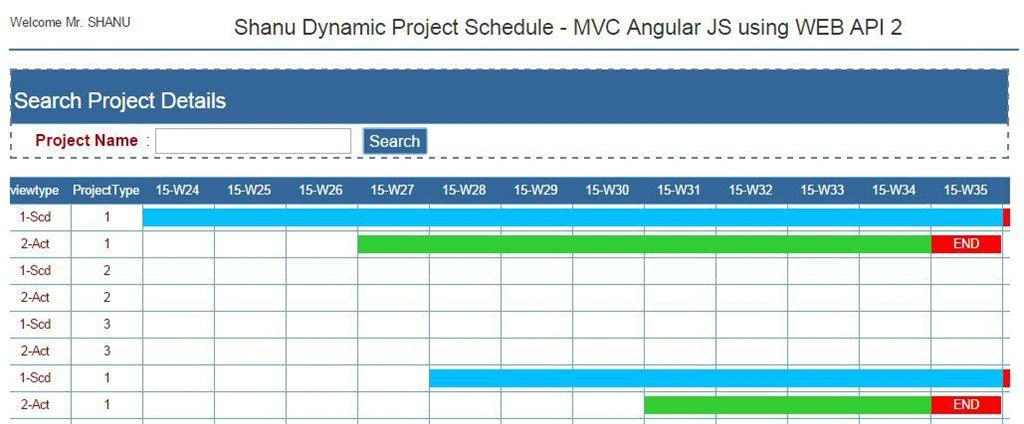
Note
For the actual data in the Pivot list I will display the result as:
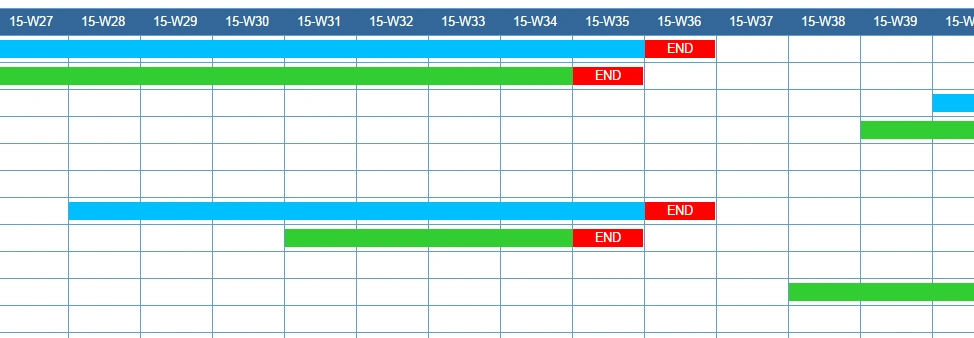
- “-1” : For End Date of both the scheduled and actual result. In my program I will check for the produced value, if its “-1” then I will display the text as “END” with Red background color to notify the user for the end date of each project.
- “0” : If the result value is “0” then it means the days are not in any schedule or actual days so it should be left blank.
- “1” : If the result is “1” is to indicate as the scheduled start and end days. I will be using Blue to display the schedule days.
- “2” : If the result is “1” is to indicate the actual start and end days. I will be using Green to display the schedule days.
This is only a sample procedure that provides a sample program for the project schedule. You can custamize this table, procedure and program depending on your requirements. You can set your own rule and status to display the result.
- -- 3. This temp table is created toScedule details with result here i have used the Union ,
- --the 1st query return the Schedule Project result and the 2nd query returns the Actual Project result both this query will be inserted to a Temp Table
- --3.Start /////////////
- IF OBJECT_ID('tempdb..#TEMP_results') IS NOT NULL
- DROP TABLE #TEMP_results
- SELECT ProjectName,viewtype,ProjectType,resultnew,YMWK
- INTO #TEMP_results
- FROM(
- SELECT
- A.ProjectName ProjectName -- Our Project Name
- ,'1-Scd' viewtype -- Our View type first we display Schedule Data and then Actual
- , A. ProjectType ProjectType -- Our Project type here you can use your own status as Urgent,normal and etc
- , Case when cast(DATEPART( wk, max(A.SCHED_ED_DT)) as varchar(2)) = cast(DATEPART( wk, WkStartSundays) as varchar(2)) then -1 else
- case when min(A.SCHED_ST_DT)<= F.WkStartSundays AND max(A.SCHED_ED_DT) >= F.WkStartSundays
- then 1 else 0 end end resultnew -- perfectResult as i expect
- , RIGHT(YEAR(WkStartSundays), 2)+'-'+'W'+convert(varchar(2),Case when len(DATEPART( wk, WkStartSundays))='1' then '0'+
- cast(DATEPART( wk, WkStartSundays) as varchar(2)) else cast(DATEPART( wk, WkStartSundays) as varchar(2)) END
- ) as 'YMWK' -- Here we display Year/month and Week of our Schedule which will be displayed as the Column
- FROM -- here you can youe your own table
- SCHED_Master A (NOLOCK)
- LEFT OUTER JOIN
- #TEMP_EveryWk_Sndays F (NOLOCK) ON A.status= F.status
- WHERE -- Here you can check your own where conditions
- A.ProjectName like '%' + @projectId
- AND A.status=1
- AND A.ProjectType in (1,2,3)
- AND A.SCHED_ST_DT <= @ToDate
- AND A.SCHED_ED_DT >= @FromDate
- GROUP BY
- A.ProjectName
- , A. ProjectType
- ,A.SCHED_ED_DT
- ,F.WkStartSundays
- UNION -- This query is to result the Actual result
- SELECT
- A.ProjectName ProjectName -- Our Project Name
- ,'2-Act' viewtype -- Our View type first we display Schedule Data and then Actual
- , A. ProjectType ProjectType -- Our Project type here you can use your own status as Urgent,normal and etc
- , Case when cast(DATEPART( wk, max(A.ACT_ED_DT)) as varchar(2)) = cast(DATEPART( wk, WkStartSundays) as varchar(2)) then -1 else
- case when min(A.ACT_ST_DT)<= F.WkStartSundays AND max(A.ACT_ED_DT) >= F.WkStartSundays
- then 2 else 0 end end resultnew -- perfectResult as i expect
- , RIGHT(YEAR(WkStartSundays), 2)+'-'+'W'+convert(varchar(2),Case when len(DATEPART( wk, WkStartSundays))='1' then '0'+
- cast(DATEPART( wk, WkStartSundays) as varchar(2)) else cast(DATEPART( wk, WkStartSundays) as varchar(2)) END
- ) as 'YMWK' -- Here we display Year/month and Week of our Schedule which will be displayed as the Column
- FROM -- here you can youe your own table
- SCHED_Master A (NOLOCK)
- LEFT OUTER JOIN
- #TEMP_EveryWk_Sndays F (NOLOCK) ON A.status= F.status
- WHERE -- Here you can check your own where conditions
- A.ProjectName like '%' + @projectId
- AND A.status=1
- AND A.ProjectType in (1,2,3)
- AND A.ACT_ST_DT <= @ToDate
- AND A.ACT_ED_DT >= @FromDate
- GROUP BY
- A.ProjectName
- , A. ProjectType
- ,A.SCHED_ED_DT
- ,F.WkStartSundays
- ) q
- --3.End /////////////

Chervine BhiwooPosted Aug 8, 2015, 2:21 AM
Very detailed! Thanks for sharing!
Upendra Pratap ShahiPosted Aug 7, 2015, 2:09 AM
nice sir
Nilesh JadavPosted Aug 4, 2015, 12:19 AM
nice one sir
Chervine BhiwooPosted Aug 3, 2015, 11:28 PM
Nice work
Rajeesh MenothPosted Aug 3, 2015, 5:31 AM
Thank you for sharing..Good One sir
Pramod ThakurPosted Aug 3, 2015, 3:32 AM
nice one.. thx for sharing..
Neeraj KumarPosted Jul 24, 2015, 1:15 PM
Great Article Sir.Thank you for sharing :)
Vilas ShendePosted Jul 24, 2015, 4:46 AM
Great one boss ! Thanks for sharing .
Sibeesh VenuPosted Jul 24, 2015, 4:13 AM
Nice Share. Thank you
SharadPosted Jul 24, 2015, 3:14 AM
Excellent..
Santhakumar MunuswamyPosted Jul 23, 2015, 2:59 PM
Excellent work. Thanks for sharing....
junaid mPosted Jul 22, 2015, 11:58 PM
Good job
Gopi ChandPosted Jul 22, 2015, 3:07 PM
Commendable job :)
RakeshPosted Jul 22, 2015, 10:08 AM
Very Nice Sirji
Rahul Kumar SaxenaPosted Jul 22, 2015, 6:50 AM
superb
SharadPosted Jul 22, 2015, 5:51 AM
Excellent...
Chervine BhiwooPosted Jul 22, 2015, 4:25 AM
Great work!
Sibeesh VenuPosted Jul 22, 2015, 4:03 AM
Nice Share.
Sunny SharmaPosted Jul 22, 2015, 2:35 AM
Nice Share!
Nilesh JadavPosted Jul 22, 2015, 1:55 AM
Nice one sir