Note: this article is published on 09/07/2024.
After I wrote several articles on this site, I found out it seemed almost for every article, I needed to set up a sample application associated with an entity framework if accessing the database. And, every time, I needed to rewrite the setup process from scratch in order for a new reader to follow along easily. Even for introducing a very simple concept, such as Caching, I needed to spend 80% of the time setting up the sample app, and only 20% on introducing the Caching concept itself.
Therefore, I think it is better to write a basic model such as entity framework sample for various approaches, and then I can reuse them when needed. I made a list of the series of articles below, I will write them one by one, while the Entity framework overview and concept will be covered in the article (0):
- Entity Framework (0), Overview
- Entity Framework (1), with .Net MVC, Code-First
- Entity Framework (2), with .Net MVC, Database-First
- Entity Framework (3), with .Net MVC, Model-First
- Entity Framework (4), with .Net Core MVC, Code-First
- Entity Framework (5), with .Net Core MVC, Database-First
- Entity Framework (6), with .Net Core MVC, Model-First
- Entity Framework (7), with .Net WPF, Database-First
- Entity Framework (8), with .NET Core Web API, Stored Procedure
- Entity Framework (9), with .NET Core Web API, Stored Procedure Implementation
- Entity Framework (10), with .Net WebForms, Database-First
- Entity Framework (11), with .Net Core Razor Pages Code-First
- Entity Framework (12), with New .Net Core MVC Code-First
- Entity Framework (13), with .Net Core Code-First Summary
Note
We write the Entity Framework for MVC module, but the pattern is the same or similar when applying to Web Application or Web API.
A - Introduction
This article will discuss Entity Framework Architecture and Entity Data Model
- A - Introduction
- B - Entity Framework Architecture
- C - Entity Data Model
- D - EDMX file
B - Entity Framework Architecture
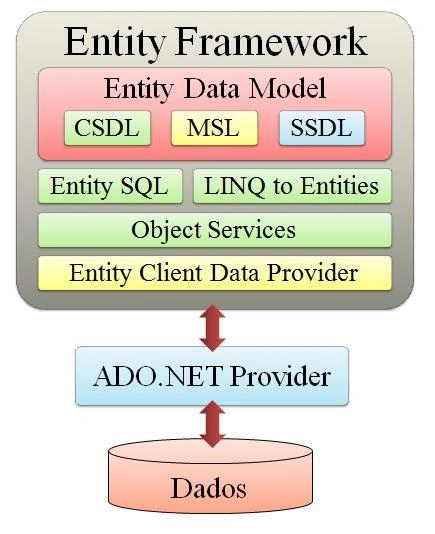
ADO.NET EF is an ORM (object-relational mapping) which creates a higher abstract object model over ADO.NET components. So rather than getting into dataset, datatables, command, and connection objects as shown in the below code, you work on higher level domain objects like customers, suppliers, etc.
The ADO .NET Entity Framework provides the following benefits:
- The Entity framework may help to remove hard-coded dependencies on storage schema.
- EF provides mapping between conceptual model and storage schema; it helps to change storage schema without effecting application code.
- Multiple conceptual models can be mapped to a single storage schema.
- EF also supports LINQ for query; again the conceptual model helps us to provide compile time validation.
Entity Framework applications and services are XML- based language information divided into three parts:
- Conceptual Model (Conceptual schema definition language (CSDL)).
- Storage Model (Store schema definition language (SSDL))
- Mapping between Conceptual and Storage Model (Mapping specification language (MSL))
These three parts of the model can be generated automatically by the Entity Data Model Tool. This tool generates the model, mapping information as well as data classes from existing database schema. Developers can change the model using graphically change conceptual model with the help of the Entity Designer or change it manually by changing XML tags.
- EDM --- Entity Data Model
- Storage Models are our database design models, which contains database tables, views, stored procs and keys with relationships.
- Conceptual Models are the model classes which contain the relationships. These are independent of the database design.
- Mapping will have the information on how the Conceptual Models are mapped to Storage Models.
- EDMX (Entity Data Model XML) is an XML file which contains all the mapping details of how your objects map with SQL tables.
- EDMP --- Entity Client Data Provider
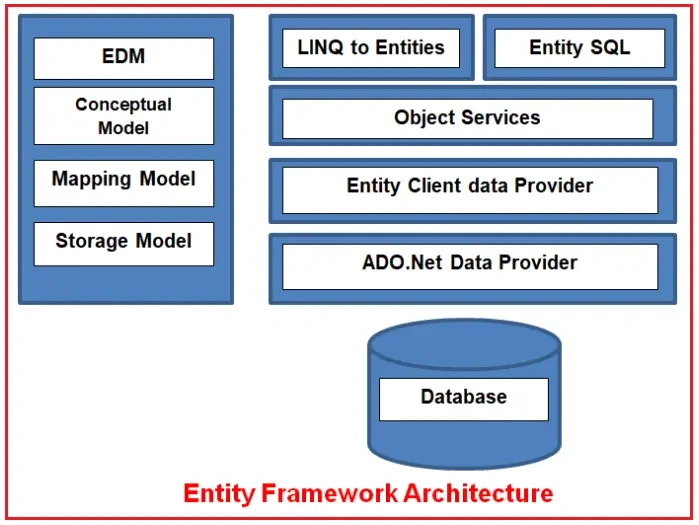
Components of Entity Framework:
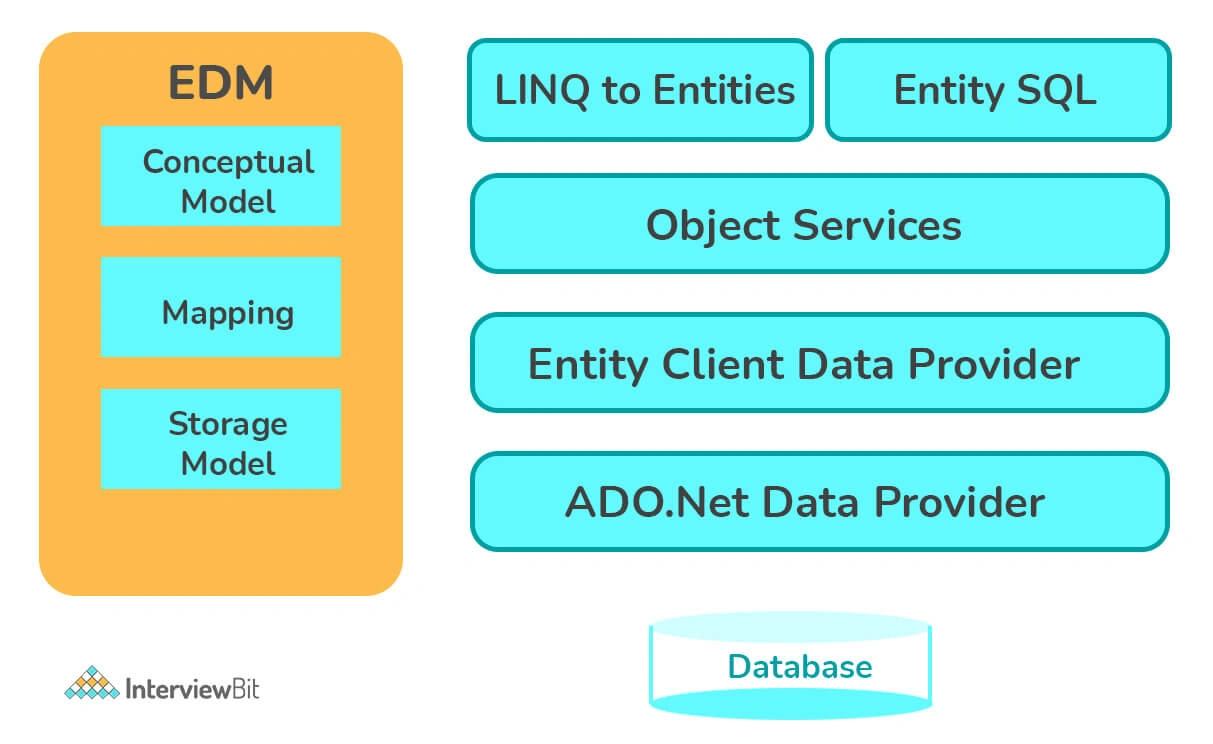
- EDM (Entity Data Model): EDM consists of three parts. These three parts are:
- Storage Schema Model
- Conceptual Model,
- Mapping Model
- LINQ-to-Entities: LINQ-to-Entities (L2E) is a query language that is used to write queries against the model of the object. It returns the entities, which is defined in the conceptual model. We can use our LINQ-to-SQL skills here.
- Entity SQL: Entity SQL is another query language (for EF 6 only), just like LINQ to Entities. However, it is a little more difficult than L2E, and the developer will have to learn it separately.
- Object Service: Object Service is the main entry point for accessing the data from the database and return it. Object Service is responsible for materialization, and materialization is the process of converting the data returned from an entity client data provider to an entry object structure.
- Entity Client Data Provider: The main responsibility of this layer is to convert the LINQ-to-Entities or Entity SQL Queries into a SQL Query, which is understood by the database. It communicates with the ADO.NET data provider, which in turn sends or retrieves the data from the database.
- ADO.NET Data Provider: This layer communicates with the database using the Standard ADO.Net.
Context Class in Entity Framework
Context Class is the most important class while working with the EF 6 or EF Core. It represents a session with the underlying database using the CRUD (Create, Read, Update, and Delete) operations.
The context class is derived from the 'System.Data.Entity.DbContext' in EF6 and EF Core both. An instance of the context class represents the Unit of Work and Repository pattern, where it can combine multiple changes under a single database transaction.
The context class is used in the query to save the data in the database. It is also used to configure the domain classes, database-related mappings, change tracking settings, caching, transactions, etc.
C - Entity Data Model
The Entity Data Model (EDM) is an extended version of the Entity-Relationship model which specifies the conceptual model of the data using various modelling technique. It also refers to a set of concepts that describe data structure, regardless of its stored form.
EDM supports a set of primitive data types that define properties in a conceptual model. We need to consider 3 core parts which form the basis for Entity Framework and collectively it is known as Entity Data Model. Following are the three core parts of EDM.
- Storage Schema Model --- also called as Storage Schema Definition Layer (SSDL) represents the schematic representation of the backend data store.
- Conceptual Model --- also called as Conceptual Schema Definition Layer (CSDL) is the real entity model, against which we write our queries.
- Mapping Model --- a mapping between the Conceptual model and the Storage model.
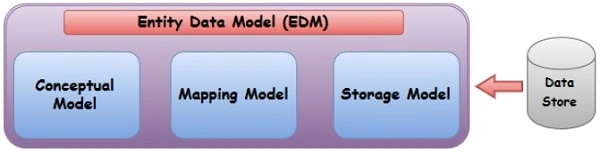
The logical schema and its mapping with the physical schema is represented as an EDM. An .edmx file is an XML file that defines a conceptual model , a storage model, and the mapping between these models. An.edmx file also contains information that is used by the ADO.NET Entity Data Model Designer (Entity Designer) to render a model graphically.
EDMX is Visual Studio's "container" for all things about your Entity Data Model.
It contains all the information that is in the CSDL, SSDL, MSL, plus information about the visual layout of the tables in your Visual Studio designer surface.
The EDMX file is converted into CSDL, SSDL, MSL (typically embedded as resources in your assembly) during the build process. You definitely don't have to distribute or copy the EDMX files anywhere for the app to run. For example, the code first approach of Entity Framework which gets by without any .edmx, .csdl/ssdl/msl files at all.
D - EDMX file
The Entity Data Model (EDM) is an extend
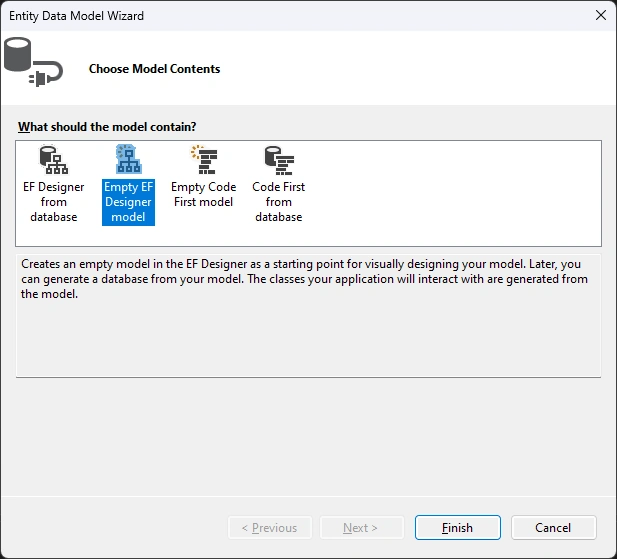
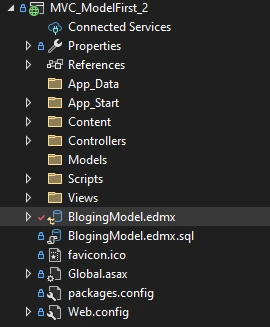
We got an EDMX file in the project;
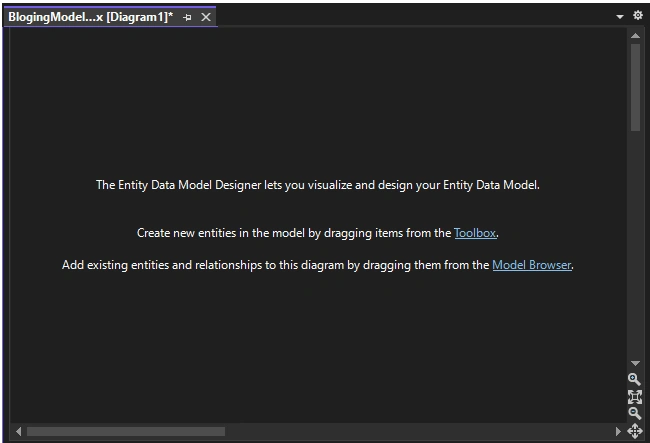
Double Click it => we got an empty design page in the IDE,
Open this file from File Browser, say, by VS Code:
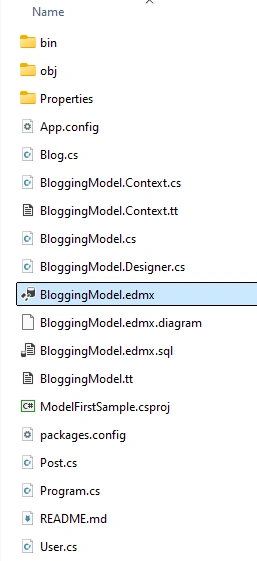
This is a XML file,
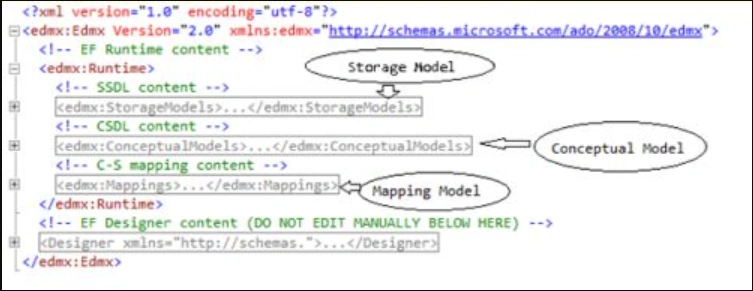
The EDMX file is divided into three sections: CSDL, SSDL, and MSL.
- CSDL (Conceptual Schema definition language) is the conceptual abstraction which is exposed to the application.
- SSDL (Storage Schema Definition Language) defines the mapping with your RDBMS data structure.
- MSL (Mapping Schema Language) connects the CSDL and SSDL.
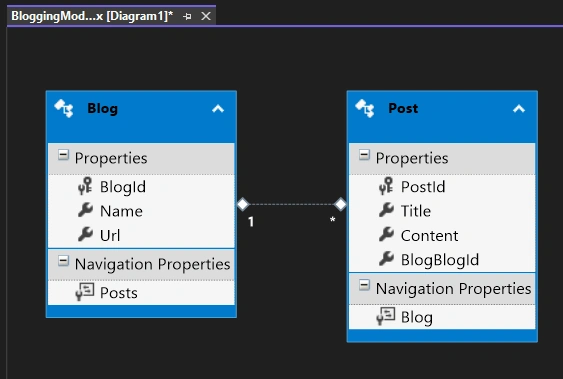
After we added two Entities like this:
EDMX --- Entity Data Model XML file will be like this:
<?xml version="1.0" encoding="utf-8"?>
<edmx:Edmx Version="3.0" xmlns:edmx="http://schemas.microsoft.com/ado/2009/11/edmx">
  <!-- EF Runtime content -->
  <edmx:Runtime>
    <!-- SSDL content -->
    <edmx:StorageModels>
      <Schema Namespace="BloggingModel.Store" Alias="Self" Provider="System.Data.SqlClient" ProviderManifestToken="2005" xmlns:store="http://schemas.microsoft.com/ado/2007/12/edm/EntityStoreSchemaGenerator" xmlns="http://schemas.microsoft.com/ado/2009/11/edm/ssdl">
        <EntityContainer Name="BloggingModelStoreContainer">
          <EntitySet Name="Blogs" EntityType="BloggingModel.Store.Blogs" store:Type="Tables" Schema="dbo" />
          <EntitySet Name="Posts" EntityType="BloggingModel.Store.Posts" store:Type="Tables" Schema="dbo" />
          <AssociationSet Name="BlogPost" Association="BloggingModel.Store.BlogPost">
            <End Role="Blog" EntitySet="Blogs" />
            <End Role="Post" EntitySet="Posts" />
          </AssociationSet>
        </EntityContainer>
        <EntityType Name="Blogs">
          <Key>
            <PropertyRef Name="BlogId" />
          </Key>
          <Property Name="BlogId" Type="int" StoreGeneratedPattern="Identity" Nullable="false" />
          <Property Name="Name" Type="nvarchar(max)" Nullable="false" />
          <Property Name="Url" Type="nvarchar(max)" Nullable="true" />
        </EntityType>
        <EntityType Name="Posts">
          <Key>
            <PropertyRef Name="PostId" />
          </Key>
          <Property Name="PostId" Type="int" StoreGeneratedPattern="Identity" Nullable="false" />
          <Property Name="BlogBlogId" Type="int" Nullable="false" />
          <Property Name="Title" Type="nvarchar(max)" Nullable="false" />
          <Property Name="Content" Type="nvarchar(max)" Nullable="false" />
        </EntityType>
        <Association Name="BlogPost">
          <End Role="Blog" Type="BloggingModel.Store.Blogs" Multiplicity="1" />
          <End Role="Post" Type="BloggingModel.Store.Posts" Multiplicity="*" />
          <ReferentialConstraint>
            <Principal Role="Blog">
              <PropertyRef Name="BlogId" />
            </Principal>
            <Dependent Role="Post">
              <PropertyRef Name="BlogBlogId" />
            </Dependent>
          </ReferentialConstraint>
        </Association>
      </Schema>
    </edmx:StorageModels>
    <!-- CSDL content -->
    <edmx:ConceptualModels>
      <Schema xmlns="http://schemas.microsoft.com/ado/2009/11/edm" xmlns:cg="http://schemas.microsoft.com/ado/2006/04/codegeneration" xmlns:store="http://schemas.microsoft.com/ado/2007/12/edm/EntityStoreSchemaGenerator" Namespace="BloggingModel" Alias="Self" xmlns:annotation="http://schemas.microsoft.com/ado/2009/02/edm/annotation" annotation:UseStrongSpatialTypes="false">
        <EntityContainer Name="BloggingContext" annotation:LazyLoadingEnabled="true">
          <EntitySet Name="Blogs" EntityType="BloggingModel.Blog" />
          <EntitySet Name="Posts" EntityType="BloggingModel.Post" />
          <AssociationSet Name="BlogPost" Association="BloggingModel.BlogPost">
            <End Role="Blog" EntitySet="Blogs" />
            <End Role="Post" EntitySet="Posts" />
          </AssociationSet>
        </EntityContainer>
        <EntityType Name="Blog">
          <Key>
            <PropertyRef Name="BlogId" />
          </Key>
          <Property Name="BlogId" Type="Int32" Nullable="false" annotation:StoreGeneratedPattern="Identity" />
          <Property Name="Name" Type="String" Nullable="false" />
          <Property Name="Url" Type="String" Nullable="true" />
          <NavigationProperty Name="Posts" Relationship="BloggingModel.BlogPost" FromRole="Blog" ToRole="Post" />
        </EntityType>
        <EntityType Name="Post">
          <Key>
            <PropertyRef Name="PostId" />
          </Key>
          <Property Name="PostId" Type="Int32" Nullable="false" annotation:StoreGeneratedPattern="Identity" />
          <NavigationProperty Name="Blog" Relationship="BloggingModel.BlogPost" FromRole="Post" ToRole="Blog" />
          <Property Name="BlogBlogId" Type="Int32" Nullable="false" />
          <Property Name="Title" Type="String" Nullable="false" />
          <Property Name="Content" Type="String" Nullable="false" />
        </EntityType>
        <Association Name="BlogPost">
          <End Type="BloggingModel.Blog" Role="Blog" Multiplicity="1" />
          <End Type="BloggingModel.Post" Role="Post" Multiplicity="*" />
          <ReferentialConstraint>
            <Principal Role="Blog">
              <PropertyRef Name="BlogId" />
            </Principal>
            <Dependent Role="Post">
              <PropertyRef Name="BlogBlogId" />
            </Dependent>
          </ReferentialConstraint>
        </Association>
      </Schema>
    </edmx:ConceptualModels>
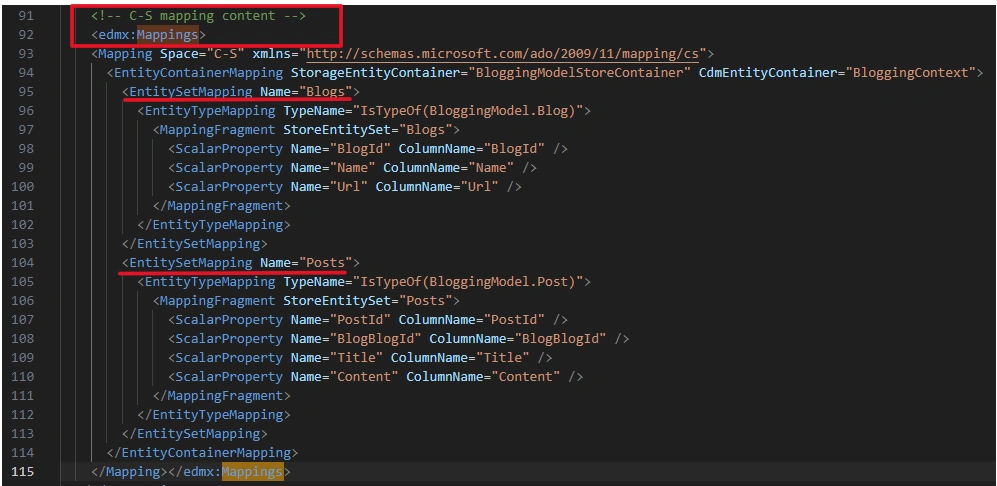
    <!-- C-S mapping content -->
    <edmx:Mappings>
    <Mapping Space="C-S" xmlns="http://schemas.microsoft.com/ado/2009/11/mapping/cs">
      <EntityContainerMapping StorageEntityContainer="BloggingModelStoreContainer" CdmEntityContainer="BloggingContext">
        <EntitySetMapping Name="Blogs">
          <EntityTypeMapping TypeName="IsTypeOf(BloggingModel.Blog)">
            <MappingFragment StoreEntitySet="Blogs">
              <ScalarProperty Name="BlogId" ColumnName="BlogId" />
              <ScalarProperty Name="Name" ColumnName="Name" />
              <ScalarProperty Name="Url" ColumnName="Url" />
            </MappingFragment>
          </EntityTypeMapping>
        </EntitySetMapping>
        <EntitySetMapping Name="Posts">
          <EntityTypeMapping TypeName="IsTypeOf(BloggingModel.Post)">
            <MappingFragment StoreEntitySet="Posts">
              <ScalarProperty Name="PostId" ColumnName="PostId" />
              <ScalarProperty Name="BlogBlogId" ColumnName="BlogBlogId" />
              <ScalarProperty Name="Title" ColumnName="Title" />
              <ScalarProperty Name="Content" ColumnName="Content" />
            </MappingFragment>
          </EntityTypeMapping>
        </EntitySetMapping>
      </EntityContainerMapping>
    </Mapping></edmx:Mappings>
  </edmx:Runtime>
  <!-- EF Designer content (DO NOT EDIT MANUALLY BELOW HERE) -->
  <edmx:Designer xmlns="http://schemas.microsoft.com/ado/2009/11/edmx">
    <edmx:Connection>
      <DesignerInfoPropertySet>
        <DesignerProperty Name="MetadataArtifactProcessing" Value="EmbedInOutputAssembly" />
      </DesignerInfoPropertySet>
    </edmx:Connection>
    <edmx:Options>
      <DesignerInfoPropertySet>
        <DesignerProperty Name="ValidateOnBuild" Value="true" />
        <DesignerProperty Name="EnablePluralization" Value="True" />
        <DesignerProperty Name="CodeGenerationStrategy" Value="None" />
        <DesignerProperty Name="UseLegacyProvider" Value="True" />
      </DesignerInfoPropertySet>
    </edmx:Options>
    <!-- Diagram content (shape and connector positions) -->
    <edmx:Diagrams>
    </edmx:Diagrams>
  </edmx:Designer>
</edmx:Edmx>
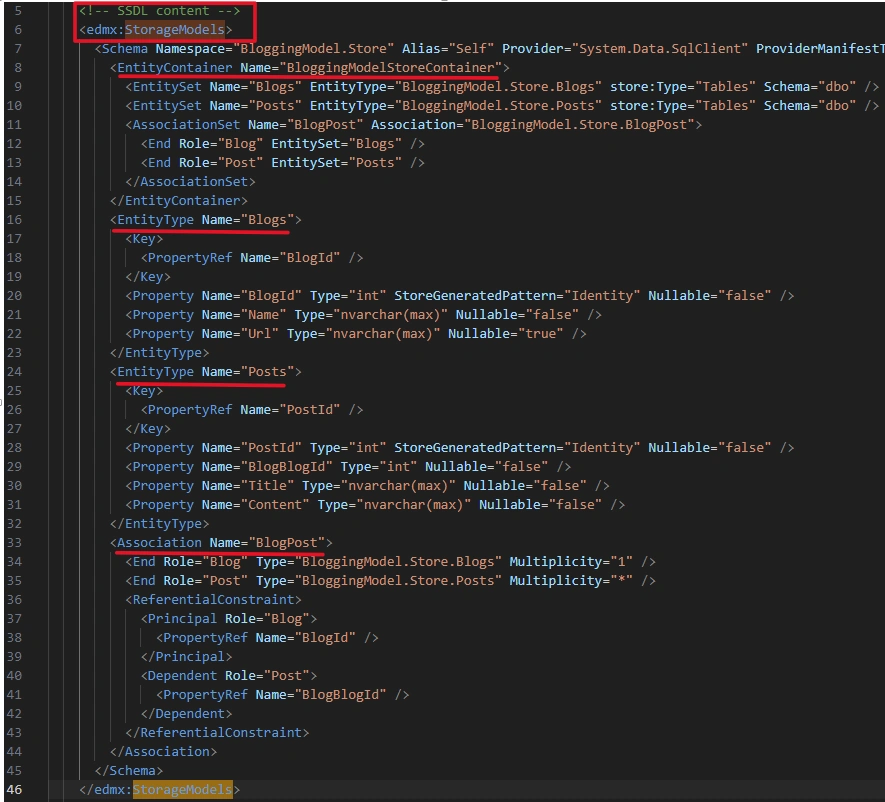
Storage Models: by SSDL (Storage Schema Definition Language)
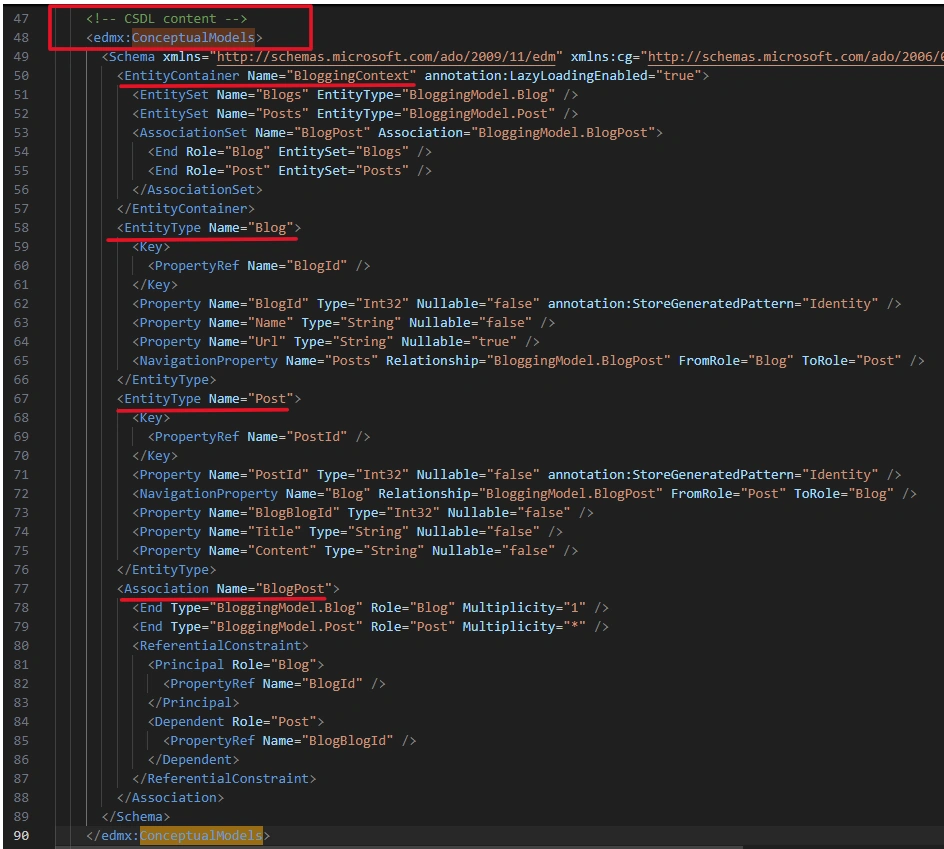
Conceptual Models by CSDL (Conceptual Schema Definition Language)
Mappings by MSL (Mapping Schema Language)
The following figure illustrates the conventions mapping with the database:
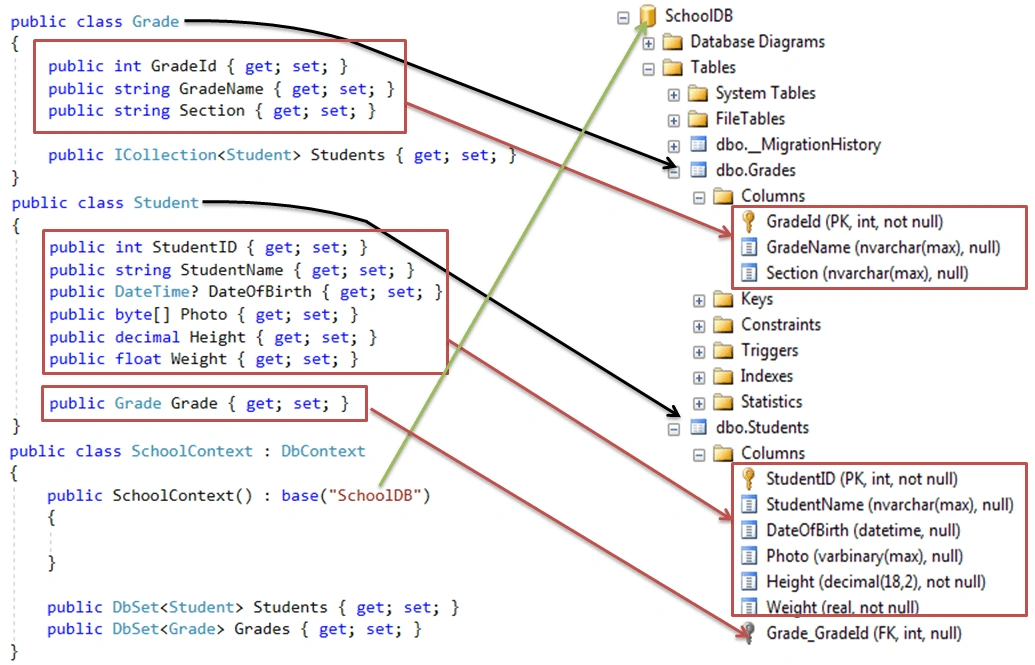
from Code-First Conventions in Entity Framework 6
References:


Join the conversation! Your thoughts help the community grow.