

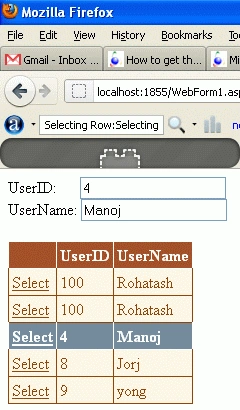
In this article, you will learn how to get the selected row in a GridView and display the values in TextBoxes using ASP.NET. A GridView allows us to select only a single row at a time. The sample makes use of the database. We will be pulling data from the UserDetail table.
Creating Table in SQL Server Database
Now create a table named UserDetail with the columns UserID and UserName. The table looks as below.
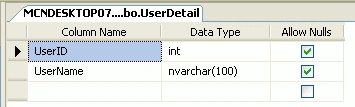
Now insert data into the table.

First of all drag the GridView control from the Data controls menu. It will add the GridView control's HTML source code as given above.
- <asp:GridView ID="GridView2" runat="server"></asp:GridView>
.aspx source code
- <%@ Page Language="C#" AutoEventWireup="true" CodeBehind="WebForm1.aspx.cs" Inherits="WebApplication120.WebForm1" %>
- <!DOCTYPE html PUBLIC "-//W3C//DTD XHTML 1.0 Transitional//EN" "http://www.w3.org/TR/xhtml1/DTD/xhtml1-transitional.dtd">
- <html xmlns="http://www.w3.org/1999/xhtml">
- <head runat="server">
- <title></title>
- </head>
- <body>
- <form id="form1" runat="server">
- <div>
- UserID:
- <asp:TextBox ID="TextBoxUserID" runat="server"></asp:TextBox>
- <br />
- UserName:
- <asp:TextBox ID="TextBoxUserName" runat="server"></asp:TextBox>
- <br />
- <br />
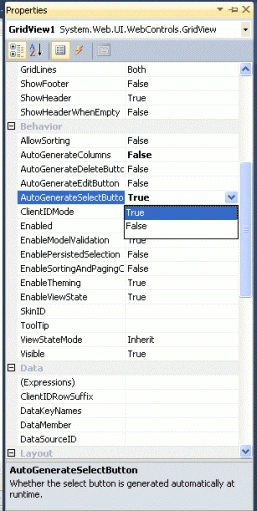
- <asp:GridView ID="GridView1" runat="server" AutoGenerateSelectButton="True" OnSelectedIndexChanged="GridView1_SelectedIndexChanged"
- BackColor="#DEBA84" BorderColor="#DEBA84" BorderStyle="None" BorderWidth="1px"
- CellPadding="3" CellSpacing="2" AutoGenerateColumns="False">
- <FooterStyle BackColor="#F7DFB5" ForeColor="#8C4510" />
- <HeaderStyle BackColor="#A55129" Font-Bold="True" ForeColor="White" />
- <PagerStyle ForeColor="#8C4510" HorizontalAlign="Center" />
- <RowStyle BackColor="#FFF7E7" ForeColor="#8C4510" />
- <SelectedRowStyle BackColor="#738A9C" Font-Bold="True" ForeColor="White" />
- <SortedAscendingCellStyle BackColor="#FFF1D4" />
- <SortedAscendingHeaderStyle BackColor="#B95C30" />
- <SortedDescendingCellStyle BackColor="#F1E5CE" />
- <SortedDescendingHeaderStyle BackColor="#93451F" />
- <Columns>
- <asp:BoundField HeaderText="UserID" DataField="UserID" />
- <asp:BoundField HeaderText="UserName" DataField="UserName" />
- </Columns>
- </asp:GridView>
- </div>
- </form>
- </body>
- </html>
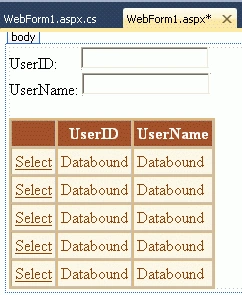
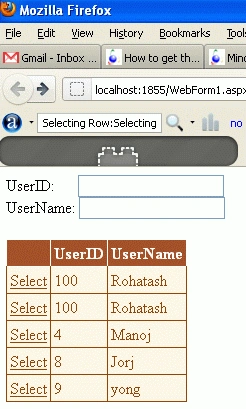
Edwin MerinoPosted May 11, 2020, 10:01 PM
Thanks a lot!
Toan TranPosted Jan 31, 2019, 12:20 AM
If you hide UseriD, you can not get it on textbox. This way not good
Thiruppathi RPosted Jun 12, 2016, 12:57 PM
Helpful article...
Syed ShakeerPosted Dec 11, 2014, 12:45 PM
Hi Kumar, Thanks for reading and doing the same job which i posted article on June 25 2010. http://www.c-sharpcorner.com/uploadfile/syedshakeer/how-to-get-the-values-of-selected-row-from-a-gridview-using-Asp-Net/
jashim uddinPosted Jul 3, 2013, 3:06 AM
its only works with txt boxes but not in Drop-down ||
jawahar rajPosted Nov 21, 2012, 1:21 AM
its not working for me..i used the same code
Abumiyan MuqriPosted May 30, 2012, 8:19 AM
I have one gridview in that there are 4 columns namely "User ID","Description","Display Password","Change Password". I have put an Image Button in Change Password Column for each cell. Below the Gridview there are 3 text boxes. When I click on Change Password, the User ID of that particular row should be displayed in text box 1. How to do this in asp.net with C# and back end is MySql DB server.
Abumiyan MuqriPosted May 30, 2012, 7:58 AM
I want the same code but without SELECT button in gridview. Suppose I put UserName as ImageButton and when i click on particular UserName, the UserId of that User should be displayed in UserID textbox. Please help me with both .aspx as well as .cs files.
khalid MehmoodeditedPosted Feb 9, 2012, 9:05 AMEdited Feb 9, 2012, 9:07 AM
In this example if second TextField has a Password mode then Grid view can not show text in Password mode textbox.