
Introduction
The Web offers a variety of APIs to build your app or website. You could access using JavaScript code. These days the browser offers many APIs to developers. In this article, we will explore the XMLHttpRequest API.
Before moving further let us look at the previous articles of the JavaScript series:
- Voice of a Developer: JavaScript Data Types - Part One
- Voice of a Developer: JavaScript Objects - Part Two
- Voice of a Developer: JavaScript Engines - Part Three
- Voice of a Developer: JavaScript Common Mistakes - Part Four
- Voice of a Developer: Editors - Part Five
- Voice of a Developer: VSCode - Part Six
- Voice of a Developer: Debugging Capabilities of VSCode - Part Seven
- Voice of a Developer: JavaScript OOP - Part Eight
- Voice of a Developer: JavaScript Useful Reserved Keywords - Part Nine
- Voice of a Developer: JavaScript Functions - Part Ten
- Voice of a Developer: JavaScript Functions Invocations - Part Eleven
- Voice of a Developer: JavaScript Anonymous Functions - Part Twelve
- Voice of a Developer: JavaScript Pure And Impure Function - Part Thirteen
- Voice of a Developer: JavaScript Closures - Part Fourteen
- Voice of a Developer: JavaScript Currying - Part Fifteen
- Voice of a Developer: JavaScript Chaining - Part Sixteen
- Voice of a Developer: JavaScript Array Methods - Part Seventeen
- Voice of a Developer: JavaScript ECMAScript 6 - Part Eighteen
- Voice of a Developer: JavaScript ECMAScript 6 Features v1 - Part Nineteen
- Voice of a Developer: JavaScript ECMAScript 6 Features v2 - Part Twenty
- Voice of a Developer: JavaScript Web Workers - Part Twenty One
- Voice of a Developer: JavaScript JSLint v1 - Part Twenty-Two
- Voice of a Developer: JavaScript JSLint v2 - Part Twenty Three
XMLHttpRequest (XHR)
* @description
* The `$http` service is a core Angular service that facilitates communication with the remote
* HTTP servers via the browser's [XMLHttpRequest]
* object or via [JSONP]
Example
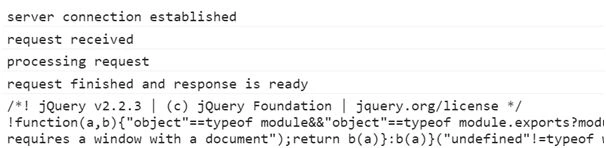
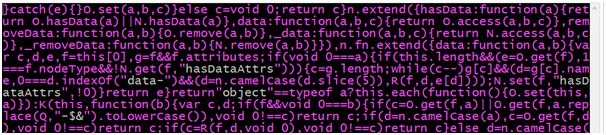
In 1st example we will create XHR object and download jQuery by sending GET request,
- varmyRequest = new XMLHttpRequest(); //myRequest is an object created by XHR API
- console.log(typeof(myRequest)); // object
- myRequest.open('GET', 'https://code.jquery.com/jquery-2.2.3.min.js');
- myRequest.send();
- myRequest.onreadystatechange = function()
- {
- if (myRequest.readyState == 4 && myRequest.status == 200)
- {
- console.log(myRequest.responseText);
- }


Rajib Das GuptaPosted Jun 26, 2016, 2:45 AM
Great one
Neeraj KumarPosted May 17, 2016, 2:54 PM
Good
Kuppurasu NagarajPosted May 17, 2016, 10:55 AM
Nice sharing..
Debasis SahaPosted May 17, 2016, 9:49 AM
Nice one..
Guest UserPosted May 17, 2016, 8:36 AM
a. CORS b. JSONP c. Disable browser cross domain flag (chromium-browser --disable-web-security)
Guest UserPosted May 17, 2016, 8:35 AM
Dear Maruthi Palllamalli, thanks for reading & asking question! I think XMLHttpRequest is easy to fetch data, you may differ with it. You raised a valid point Cross Domains. There are various ways to solve this Cross Domain issue....
Maruthi PalllamalliPosted May 17, 2016, 8:05 AM
How did you say 'XMLHttpRequest ' is an easy way to get data from url. Can we get data from cross domains like from ('http://localhost:8080/Service.svc/getdata') webservices or wcf services ?
Guest UserPosted May 17, 2016, 6:45 AM
thnx Jitenfra
Guest UserPosted May 17, 2016, 6:44 AM
Thanks Bhuvanesh
Bhuvanesh MohankumarPosted May 17, 2016, 5:46 AM
Great Series
Jitendra KumarPosted May 17, 2016, 2:15 AM
Good One...Thanks for sharing..