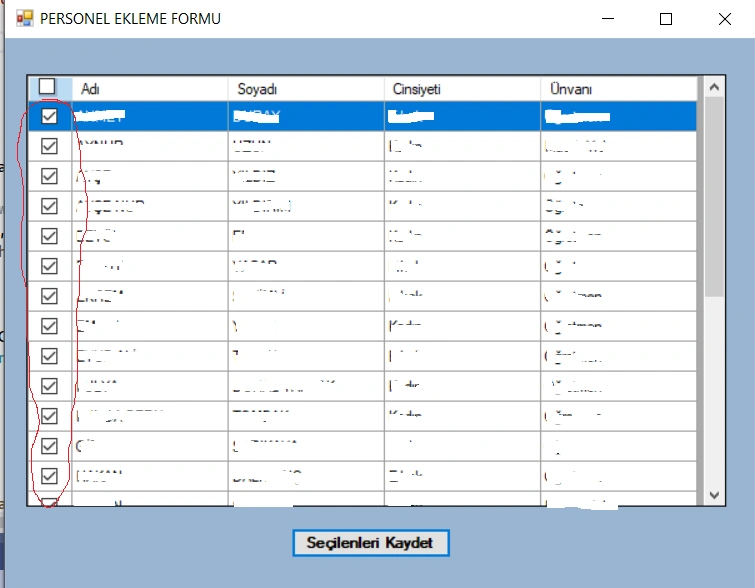
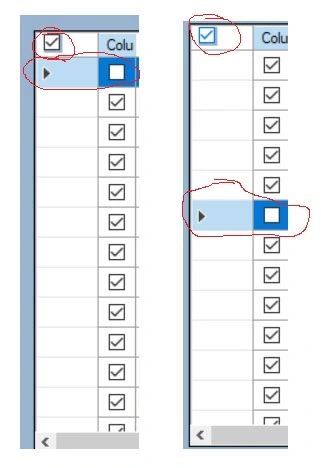
have two problems with the below checkbox codes. One of them is that all checkboxes come as true initially. Second, the header checkbox does not effect the checkbox where the row is selected.
private void PersonelEkle_Load(object sender, EventArgs e)
{
DataGridViewCheckBoxColumn CBColumn = new DataGridViewCheckBoxColumn();
CBColumn.Width = 30;
CBColumn.FalseValue = "0";
CBColumn.TrueValue = "1";
CBColumn.DataPropertyName = "id";
CBColumn.ReadOnly = false;
dataGridView1.Columns.Insert(0, CBColumn);
Point headerCellLocation = this.dataGridView1.GetCellDisplayRectangle(0, -1, true).Location;
// Create the header CheckBox
headerCheckBox = new System.Windows.Forms.CheckBox();
headerCheckBox.Size = new Size(15, 15);
headerCheckBox.CheckedChanged += headerCheckBox_CheckedChanged;
headerCheckBox.Checked = false;
// Add the header CheckBox to the DataGridView's column header
dataGridView1.Controls.Add(headerCheckBox);
headerCheckBox.Location = new Point(headerCellLocation.X + 8, headerCellLocation.Y + 2);
DoubleBuffered = true;
Listele();
}
private void headerCheckBox_CheckedChanged(object sender, EventArgs e)
{
foreach (DataGridViewRow row in dataGridView1.Rows)
{
DataGridViewCheckBoxCell checkBoxCell = (DataGridViewCheckBoxCell)row.Cells[0];
checkBoxCell.Value = headerCheckBox.Checked;
}
}
Rajkiran SwainPosted Jun 8, 2023, 5:06 AM
Amit MohantyPosted Jun 8, 2023, 10:43 AM
Based on the provided information, it appears that the line
CBColumn.DataPropertyName = "id";is causing all checkboxes to be unchecked. It suggests that if you remove this line, the checkboxes will remain unchecked. Alternatively, if you want to keep this line, you need to ensure that the "id" property initially contains the value 0 (zero).Mehmet FatihPosted Jun 8, 2023, 8:59 AM
Thank all of you. I made the necessary changes as per your advice. The second problem has ben solved but the first problem is the same although I have changed CBColumn.TrueValue = "1"; to CBColumn.TrueValue = true; and CBColumn.TrueValue = "0"; to CBColumn.TrueValue = false. All of the checkboxes come as true.
Deepak RawatPosted Jun 8, 2023, 5:06 AM
All checkboxes coming as true initially: The issue arises because the
TrueValueandFalseValueproperties of theDataGridViewCheckBoxColumnare set to strings ("1" and "0") instead of booleans (true and false). To fix this, you can set theTrueValueandFalseValueproperties to the respective boolean values:The header checkbox not affecting the checkboxes in the rows: The issue occurs because you are not updating the underlying data source when the header checkbox state changes. To fix this, you can modify the
headerCheckBox_CheckedChangedevent handler to update the underlying data source and refresh theDataGridView:These changes should resolve the issues you mentioned with the checkbox functionality.