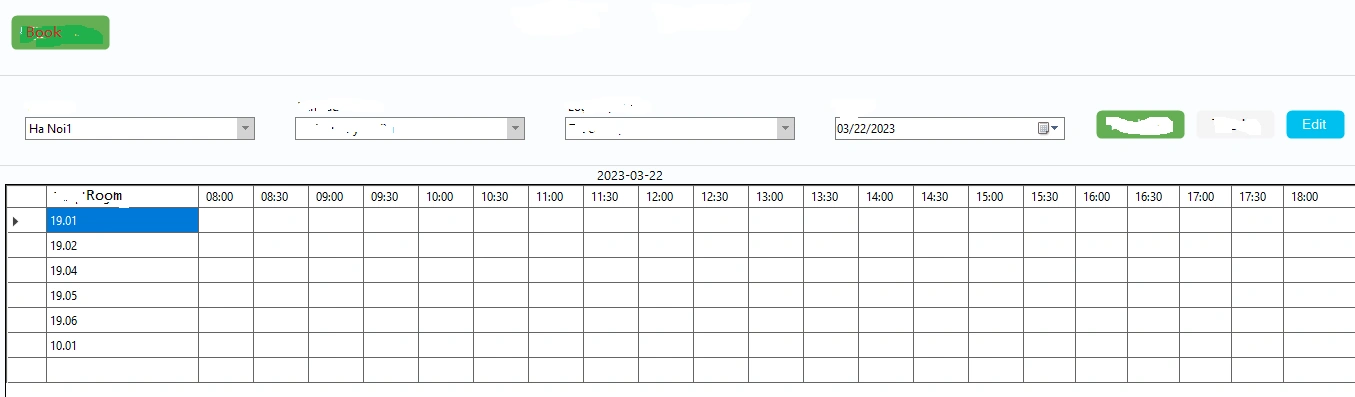
I have 2 table on api data: Booking{... },Room{.. } After booking and save the meeting room, the data will be submitted to the Booking table. on form i create datagridview to view. Get the list of rooms in the Room api table and add new hour columns from 08:00 to 18:00. I have a data sheet and after I set the schedule, I want to upload all meeting rooms and meeting times like the picture above, but I can not.
private void loadDataRoom()//function load room to datagrdiview
{

    try
    {
        QueryRQ query = CreateQuery();
        RoomIndexRS result = apiBooking.getRoom(query).Result;

        if (result == null)
        {
            MessageBox.Show("Không l?y du?c k?t qu? t? phía server", Program.Setting.Language.GetString("captionerror"), MessageBoxButtons.OK, MessageBoxIcon.Error);
            return;
        }
        else if (result.Status != 200)
        {
            MessageBox.Show(result.Error, Program.Setting.Language.GetString("captionerror"), MessageBoxButtons.OK, MessageBoxIcon.Error);
            return;
        }
        else
        {

            grdRoom.DataSource = result.Data;
            grdRoom.Columns.Remove("Status");
            grdRoom.Columns.Remove("Sort");
            grdRoom.Columns.Remove("CreatedDate");
            grdRoom.Columns.Remove("CreatedAt");
            grdRoom.Columns.Remove("CreatedBy");
            grdRoom.Columns.Remove("UpdatedAt");
            grdRoom.Columns.Remove("UpdatedBy");
            grdRoom.Columns.Remove("CodeName");
            // grdRoom.Columns.Remove("Name");
            grdRoom.Columns.Remove("LocationId");
            grdRoom.Columns.Remove("Volumn");
            grdRoom.Columns.Remove("Items");
            grdRoom.Columns.Remove("Images");
            string columns = "name";
            string[] _arrColumns = columns.Split(',');
            grdRoom.Columns["name"].Width = 152;

            foreach (DataGridViewColumn col in grdRoom.Columns)
            {

                if (_arrColumns.Contains(col.Name.ToLower()))
                {
                    col.DisplayIndex = _arrColumns.ToList().LastIndexOf(col.Name.ToLower());
                    col.HeaderText = Program.Setting.Language.GetString("colgrd" + col.Name);
                    col.Resizable = DataGridViewTriState.True;

                }
                else
                {
                    col.Visible = false;
                }
            }
            //// Create a new column
            column1Room = new DataGridViewTextBoxColumn();
            column1Room.HeaderText = "08:00"; // Set the header text
            column1Room.Name = "column1"; // Set the name of the column
            column1Room.Width = 55;
            grdRoom.Columns.Add(column1Room);
            column2Room = new DataGridViewTextBoxColumn();
            column2Room.HeaderText = "08:30"; // Set the header text
            column2Room.Name = "column2"; // Set the name of the column
            column2Room.Width = 55;
            grdRoom.Columns.Add(column2Room);
            column3Room = new DataGridViewTextBoxColumn();
            column3Room.HeaderText = "09:00"; // Set the header text
            column3Room.Name = "column3"; // Set the name of the column
            column3Room.Width = 55;
            grdRoom.Columns.Add(column3Room);
            column4Room = new DataGridViewTextBoxColumn();
            column4Room.HeaderText = "09:30"; // Set the header text
            column4Room.Name = "column4"; // Set the name of the column
            column4Room.Width = 55;
            grdRoom.Columns.Add(column4Room);
            column5Room = new DataGridViewTextBoxColumn();
            column5Room.HeaderText = "10:00"; // Set the header text
            column5Room.Name = "column5"; // Set the name of the column
            column5Room.Width = 55;
            grdRoom.Columns.Add(column5Room);
            column6Room = new DataGridViewTextBoxColumn();
            column6Room.HeaderText = "10:30"; // Set the header text
            column6Room.Name = "column6"; // Set the name of the column
            column6Room.Width = 55;
            grdRoom.Columns.Add(column6Room);
            column7Room = new DataGridViewTextBoxColumn();
            column7Room.HeaderText = "11:00"; // Set the header text
            column7Room.Name = "column7"; // Set the name of the column
            column7Room.Width = 55;
            grdRoom.Columns.Add(column7Room);
            column8Room = new DataGridViewTextBoxColumn();
            column8Room.HeaderText = "11:30"; // Set the header text
            column8Room.Name = "column8"; // Set the name of the column
            column8Room.Width = 55;
            grdRoom.Columns.Add(column8Room);
            column9Room = new DataGridViewTextBoxColumn();
            column9Room.HeaderText = "12:00"; // Set the header text
            column9Room.Name = "column9"; // Set the name of the column
            column9Room.Width = 55;
            grdRoom.Columns.Add(column9Room);
            column10Room = new DataGridViewTextBoxColumn();
            column10Room.HeaderText = "12:30"; // Set the header text
            column10Room.Name = "column10"; // Set the name of the column
            column10Room.Width = 55;
            grdRoom.Columns.Add(column10Room);
            column11Room = new DataGridViewTextBoxColumn();
            column11Room.HeaderText = "13:00"; // Set the header text
            column11Room.Name = "column11"; // Set the name of the column
            column11Room.Width = 55;
            grdRoom.Columns.Add(column11Room);
            column12Room = new DataGridViewTextBoxColumn();
            column12Room.HeaderText = "13:30"; // Set the header text
            column12Room.Name = "column12"; // Set the name of the columng
            column12Room.Width = 55;
            grdRoom.Columns.Add(column12Room);
            column13Room = new DataGridViewTextBoxColumn();
            column13Room.HeaderText = "14:00"; // Set the header text
            column13Room.Name = "column13"; // Set the name of the column
            column13Room.Width = 55;
            grdRoom.Columns.Add(column13Room);
            column14Room = new DataGridViewTextBoxColumn();
            column14Room.HeaderText = "14:30"; // Set the header text
            column14Room.Name = "column14"; // Set the name of the column
            column14Room.Width = 55;
            grdRoom.Columns.Add(column14Room);
            column15Room = new DataGridViewTextBoxColumn();
            column15Room.HeaderText = "15:00"; // Set the header text
            column15Room.Name = "column15"; // Set the name of the column
            column15Room.Width = 55;
            grdRoom.Columns.Add(column15Room);
            column16Room = new DataGridViewTextBoxColumn();
            column16Room.HeaderText = "15:30"; // Set the header text
            column16Room.Name = "column16"; // Set the name of the column
            column16Room.Width = 52;
            grdRoom.Columns.Add(column16Room);
            column17Room = new DataGridViewTextBoxColumn();
            column17Room.HeaderText = "16:00"; // Set the header text
            column17Room.Name = "column17"; // Set the name of the column
            column17Room.Width = 52;
            grdRoom.Columns.Add(column17Room);
            column18Room = new DataGridViewTextBoxColumn();
            column18Room.HeaderText = "16:30"; // Set the header text
            column18Room.Name = "column18"; // Set the name of the column
            column18Room.Width = 52;
            grdRoom.Columns.Add(column18Room);
            column19Room = new DataGridViewTextBoxColumn();
            column19Room.HeaderText = "17:00"; // Set the header text
            column19Room.Name = "column19"; // Set the name of the column
            column19Room.Width = 52;
            grdRoom.Columns.Add(column19Room);
            column20Room = new DataGridViewTextBoxColumn();
            column20Room.HeaderText = "17:30"; // Set the header text
            column20Room.Name = "column20"; // Set the name of the column
            column20Room.Width = 52;
            grdRoom.Columns.Add(column20Room);
            column21Room = new DataGridViewTextBoxColumn();
            column21Room.HeaderText = "18:00"; // Set the header text
            column21Room.Name = "column21"; // Set the name of the column
            grdRoom.Columns.Add(column21Room);
        }

    }
    catch (Exception ex)
    {
        MessageBox.Show(ex.Message);
    }
}
private void selectAreaColor()//function get color of room and time
{
    QueryRQ query = CreateQuery();
    BookingIndexRS result = apiBooking.getBooking(query).Result;

    foreach (BookingDetail r in result.Data)
    {
        string idLocal = r.Id.ToString();
        string idroom = r.RoomId.ToString();
        string roomName = r.RoomName.ToString();
        string start = r.Start.ToString();
        string stop = r.Stop.ToString();
        string datestring = r.Date.ToString();
        string format = "yyyy-MM-ddTHH:mm:ssZ";
        DateTime datebook = DateTime.ParseExact(datestring, format, CultureInfo.InvariantCulture);
        // Get the start time and end time inputs and the selected meeting room
        DateTime startTime = DateTime.ParseExact(start, "HH:mm", null);
        DateTime stopTime = DateTime.ParseExact(stop, "HH:mm", null);

        if(datebook.Date== dateNgay.Value.Date)
        {
            foreach (DataGridViewRow row in grdRoom.Rows)
            {
                if (row.Cells["Id"].Value.ToString() == idroom)
                {
                    int rowIndex = row.Index;
                    //lo?i tr? các c?t trong b?ng Room
                    List excluHeadertext = new List() { "Tên phòng h?p","Id", "Status", "Sort", "CreatedDate", "CreatedAt", "CreatedBy", "UpdatedAt",
                "UpdatedBy", "CodeName", "Name", "LocationId","Volumn", "Items", "Images"};
                    // Loop through the columns and compare the start and end times with the time slots
                    for (int i = 1; i < grdRoom.Columns.Count; i++)
                    {
                        if (!excluHeadertext.Contains(grdRoom.Columns[i].HeaderText))
                        {
                            DateTime columnTime = DateTime.ParseExact(grdRoom.Columns[i].HeaderText, "HH:mm", CultureInfo.InvariantCulture);
                            DateTime startColumnTime = new DateTime(startTime.Year, startTime.Month, startTime.Day, columnTime.Hour, columnTime.Minute, 0);
                            string _HeaderText = grdRoom.Columns[i].Name.ToString();
                            if (startTime == columnTime)
                            {
                                grdRoom.Rows[rowIndex].Cells[_HeaderText].Style.BackColor = Color.Blue;
                                if (startTime == stopTime)
                                    return;
                                else
                                    startTime = startTime.AddMinutes(30);
                            }
                        }
                    }
                }
            }
        }
    }
}
Tuhin PaulPosted Mar 24, 2023, 1:45 PM
The code iterates over each booking and finds the corresponding row in the DataGridView for the room. If the row doesn't exist yet, it adds a new row and sets the name cell value to the room name.
For each booking, it iterates over the time slots between the booking start time and end time, and sets the value of the corresponding cell in the row to the booking information (title, username, and phone number). If the cell already has a booking in it, the code appends the new booking information to the existing value.
Tuhin PaulPosted Mar 24, 2023, 1:44 PM
Tuhin PaulPosted Mar 24, 2023, 1:44 PM
You have already created the columns for the time slots in the loadDataRoom() function. You can populate the data into the DataGridView by iterating over the Booking data and setting the values of the corresponding cells based on the Room and booking time.