hello! how are you?
i have a problem in developing my project.
i want that in my project create label dynamically to (number of database(datatable)rows count * columns count) and fill that labels with datatable Informations but we have a many errors:The following sourcecode:
private void TxtSearch_TextChanged(object sender, EventArgs e)
{
string selectstr = "";
SqlConnection conn = new SqlConnection(adresedatabase);
switch (comboBox1.SelectedIndex)
{
case 0:
{
selectstr = "select * from TblKala where Barcode =@barcode";
SqlDataAdapter da = new SqlDataAdapter();
da.SelectCommand = new SqlCommand();
da.SelectCommand.Connection = conn;
da.SelectCommand.CommandText = selectstr;
da.SelectCommand.Connection = conn;
da.SelectCommand.Parameters.AddWithValue("@barcode", Convert.ToInt32(TxtSearch.Text));
conn.Open();
DataTable dt = new DataTable();
da.Fill(dt);
object result = da.SelectCommand.ExecuteScalar();
rs = Convert.ToInt32 (result);
conn.Close();
System.Windows.Forms.Label[] lb = new System.Windows.Forms.Label[Convert.ToInt32(result) * 7];
for (int i = 0; i < Convert.ToInt32(result); i++)
for (int j = 0, px = 30, py = 30; j <= 6; i++)
{
lb[Convert.ToInt32(i.ToString() + j.ToString())].Text = dt.Rows[i].ItemArray[j].ToString(); //error line//
lb[Convert.ToInt32(i.ToString() + j.ToString())].Name = "lb" + i.ToString() + j.ToString(); //error line//
this.Controls.Add(lb[Convert.ToInt32(i.ToString() + j.ToString())]); //error line//
lb[Convert.ToInt32(i.ToString() + j.ToString())].Location = new System.Drawing.Point(px, py); //error line//
px += 30;
}
break;
}
}}
database design:
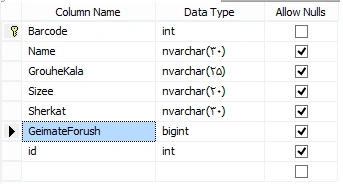
database data:
 please help me. resolve that.
Upendra Pratap ShahiPosted Jun 29, 2015, 1:29 AM
Syed ShanuPosted Jun 29, 2015, 1:01 AM
int yVal = 20;
int boxWidth = 280;
int boxHeight = 54;
lb [i] = new Button();
lb [i].Name = dts.Rows[i]["YOURCOLUMNNAME"].ToString();
lb [i].Font = new System.Drawing.Font("Arial", 12F);
lb [i].ForeColor = System.Drawing.Color.White;
lb [i].Location = new System.Drawing.Point(xVal, yVal);
lb [i].Size = new System.Drawing.Size(boxWidth, boxHeight);
lb [i].Text = dts.Rows[i]["ColumnNAme"].ToString();
Panel1.Controls.Add(lb[i]);
xVal = xVal + boxWidth + 10;
if (xVal + 100 >= Panel1.Width)
{
xVal = 10;
yVal = yVal + boxHeight+10 ;
}
}